
What breaks behind PgBouncer transaction pooling, and how to fix each one
Why you get 'prepared statement already exists', settings that leak between requests and advisory locks that lock nothing behind a transaction pooler, reproduced on PgBouncer 1.24 and PostgreSQL 17, with the fix for each and a rule for when to use the direct connection instead.
On this page

Put PgBouncer in transaction mode in front of Postgres and thousands of short-lived clients can share a few dozen server connections. The price is that "my connection" stops meaning anything between transactions. That is where errors like prepared statement "s0" already exists come from, along with a SET that shows up in someone else's request and an advisory lock that two workers both hold. This post reproduces each of these on a local PgBouncer 1.24.1 and PostgreSQL 17.11, set up the way Relyt One's pooled connection string works (transaction mode, Postgres 17), shows the fix for each, and ends with a rule for when to skip the pooler. Every command and every output below was run on that local setup.
In transaction mode, PgBouncer lends a client a server connection for one transaction and takes it back at COMMIT or ROLLBACK. A statement outside an explicit transaction is a transaction of its own. Anything that lives on the server connection longer than one transaction either leaks to the next client or is missing on the next transaction. Here are the casualties, from PgBouncer's feature table, its configuration reference and our lab:
| You use | What goes wrong | Fix |
|---|---|---|
SET statement_timeout, SET search_path, … | The setting stays on the server connection and applies to whichever client gets it next | SET LOCAL or set_config(…, true) inside a transaction; ALTER ROLE … SET for defaults |
PREPARE / EXECUTE in SQL | already exists / does not exist errors | Don't use SQL-level prepared statements through the pooler |
| Your driver's named prepared statements | The same errors, from the driver | Turn them off in the driver, or use a pooler with max_prepared_statements set |
pg_advisory_lock() | Two clients can both "hold" the same lock | pg_advisory_xact_lock() inside a transaction |
options=-c … in the connection string | Connection refused | ALTER ROLE … SET, or SET LOCAL per transaction |
LISTEN, WITH HOLD cursors, temp tables that outlive a transaction | Unreliable or wrong results | Use the direct connection |
The rest of the post shows each row happening.
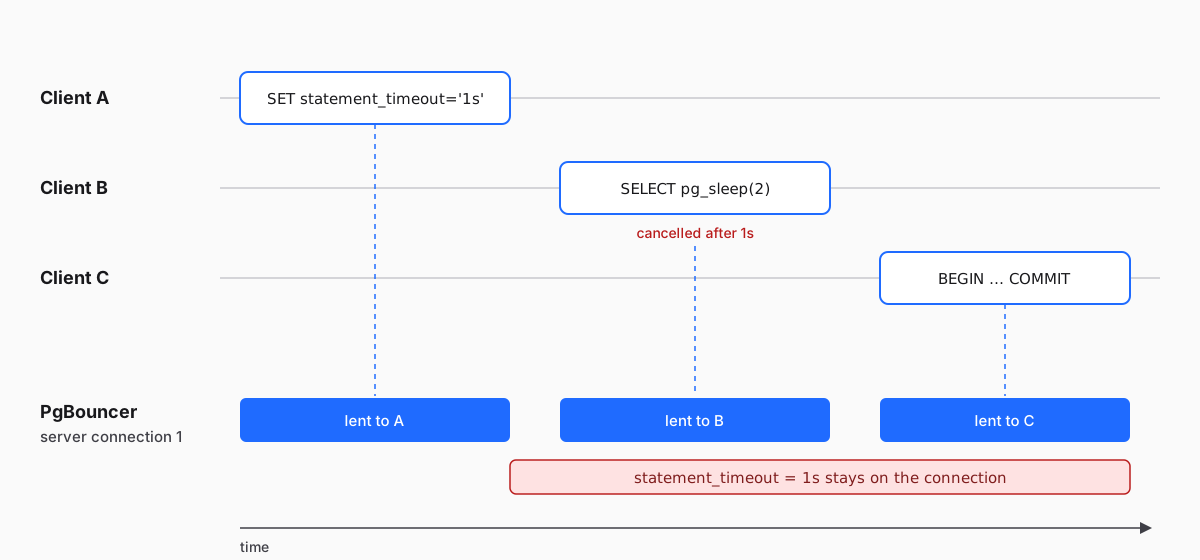
Two details from PgBouncer's configuration reference explain most of what follows:
- Nothing is reset between clients.
server_reset_query(defaultDISCARD ALL) is "not used" in transaction pooling. Whatever a transaction leaves behind on the server connection, the next client inherits. - Some settings are tracked, the rest are not. PgBouncer remembers each client's values for a short list of parameters that Postgres reports back to the client (in 1.24:
client_encoding,DateStyle,IntervalStyle,TimeZone,standard_conforming_stringsandapplication_name) and restores them when it hands that client a server connection. The feature table marks every otherSETas incompatible with transaction pooling: the change stays on the server connection, for the next client.
Everything below runs against a local Postgres 17.11 and PgBouncer 1.24.1 in Docker. The PgBouncer image is the community-maintained edoburu/pgbouncer. The pooler config uses transaction mode and leaves prepared statement tracking off, like Relyt One's pooler, but sets the pool to one server connection. With a single server connection, every client lands on the same one, so each failure happens every time instead of once in a while. In production, with dozens of server connections in the pool, the same failures are intermittent, which is exactly why they are hard to debug.
; pgbouncer.ini
[databases]
* = host=pg port=5432

[pgbouncer]
listen_addr = 0.0.0.0
listen_port = 6432
auth_type = scram-sha-256
auth_file = /etc/pgbouncer/userlist.txt
pool_mode = transaction
default_pool_size = 1
max_prepared_statements = 0
ignore_startup_parameters = extra_float_digitsecho '"app" "secret"' > userlist.txt
docker network create pgblab
docker run -d --name pg --network pgblab \
-e POSTGRES_USER=app -e POSTGRES_PASSWORD=secret -e POSTGRES_DB=app \
postgres:17.11-alpine
docker run -d --name pgbouncer --network pgblab -p 6432:6432 \
-v "$PWD/pgbouncer.ini:/etc/pgbouncer/pgbouncer.ini:ro" \
-v "$PWD/userlist.txt:/etc/pgbouncer/userlist.txt:ro" \
edoburu/pgbouncer:v1.24.1-p1
export PGPASSWORD=secretEach psql -c below is a separate client connection to PgBouncer, the way separate requests from a web app or separate serverless invocations would be. Paste this helper into your shell first:
pooled() { psql -X -h localhost -p 6432 -U app app "$@"; }Client A sets a one-second statement timeout, the way an app might at the start of a request. Client B is someone else:
pooled -c "SET statement_timeout = '1s';"
pooled -c "SHOW statement_timeout;" -c "SELECT pg_sleep(2);"SET
statement_timeout
-------------------
1s
(1 row)
ERROR: canceling statement due to statement timeoutClient B never set a timeout, and its two-second query was cancelled anyway. The SET ran in a transaction of its own, the server connection went back to the pool still carrying statement_timeout = 1s, and B got that connection. With a bigger pool, the opposite also happens: client A's next statement lands on a different server connection, where the timeout was never set. In production you see both: a setting that sometimes does not apply, and timeouts or a wrong search_path in requests that never asked for them.
The tracked parameters behave differently. The same experiment with SET TimeZone = 'Asia/Tokyo' followed by SHOW TimeZone from a second client prints UTC, because PgBouncer restores each client's own value. search_path is not on that list, and it leaks the same way statement_timeout does:
pooled -c "SET search_path = app_private, public;"
pooled -Atc "SHOW search_path;"SET
app_private, publicThe fix: scope settings to a transaction. SET LOCAL lasts until the end of the current transaction, so it applies to every statement in it and is gone before the server connection goes back to the pool:
pooled -c "BEGIN; SET LOCAL statement_timeout = '1s'; SHOW statement_timeout; COMMIT;"
pooled -Atc "SHOW statement_timeout;"BEGIN
SET
statement_timeout
-------------------
1s
(1 row)
COMMIT
0(Run pooled -c "RESET statement_timeout;" -c "RESET search_path;" first if you are following along, to clean up after the leaks above.) From application code, set_config(name, value, true) does the same as SET LOCAL and takes parameters, which makes it the usual way to pass a user ID to row-level security policies. Our managed-auth guide uses exactly that pattern, and it holds behind the pooler for the same reason.
For a setting every connection should have, attach it to the role instead:
ALTER ROLE app SET statement_timeout = '5s';Postgres applies role settings when a server connection starts. Server connections that PgBouncer already has open keep their old value; in our lab, SHOW statement_timeout through the pooler still printed 0 right after the ALTER ROLE, and 5s once PgBouncer had opened new server connections.
SQL-level prepared statements belong to a server connection. Two clients that prepare the same name end up on the same server connection sooner or later:
pooled -c "PREPARE get_one AS SELECT 1;"
pooled -c "PREPARE get_one AS SELECT 1;"PREPARE
ERROR: prepared statement "get_one" already existsPgBouncer never tracks SQL-level PREPARE: the configuration reference says it forwards PREPARE, EXECUTE and DEALLOCATE to Postgres, whatever the settings. Through a transaction pooler, don't use them. (pooled -c "DEALLOCATE ALL;" cleans up the lab.)
Most people hit this error through their driver instead. Many drivers use protocol-level prepared statements, by default or once a query repeats: they send the query once under a name, then run it by name. Here is node-postgres (pg 8.23) running a named query from two clients:
// named.js
const { Client } = require('pg');

async function main() {
  const url = process.env.DATABASE_URL;
  const a = new Client({ connectionString: url });
  const b = new Client({ connectionString: url });
  await a.connect();
  await b.connect();
  const query = { name: 'get-account', text: 'SELECT $1::int AS id' };
  try {
    console.log('a:', (await a.query({ ...query, values: [1] })).rows);
    console.log('b:', (await b.query({ ...query, values: [2] })).rows);
  } catch (err) {
    console.log('error:', err.message);
  } finally {
    await a.end();
    await b.end();
  }
}

main();npm install pg@8.23.1
DATABASE_URL=postgres://app:secret@localhost:6432/app node named.jsa: [ { id: 1 } ]
error: prepared statement "get-account" already existsThe mirror image needs a pool of two server connections. Client A runs the named query, another client opens a transaction and takes the server connection A just used, and A runs the query again. The driver remembers that it already prepared get-account, sends only the "run it" message, and lands on the other server connection: prepared statement "get-account" does not exist. We reproduced both errors in the lab.
PgBouncer 1.21 added a fix for the protocol-level case: with max_prepared_statements set above zero, it tracks the statements each client prepares and prepares them on whichever server connection the client gets. We re-ran both experiments with max_prepared_statements = 200 and both errors went away, while the SQL-level PREPARE above still failed.
On Relyt One's pooled connection string, that tracking is off (max_prepared_statements = 0), so turn off named prepared statements in your driver when you connect through the pooler:
| Driver | Through the pooler |
|---|---|
node-postgres (pg) | Don't pass name in query configs. Plain parameterized queries (client.query(text, values)) use an unnamed statement and work fine; we checked that in the lab |
| psycopg 3 | Connect with prepare_threshold=None, which disables prepared statements |
| asyncpg | Pass statement_cache_size=0 to connect() or create_pool(), as its FAQ recommends for PgBouncer |
| Prisma | Add pgbouncer=true to the pooled URL, and run migrations over a direct URL. Prisma's guide drops the flag for PgBouncer 1.21 and later, but that assumes max_prepared_statements is above zero, which it isn't here (see Prisma's PgBouncer guide) |
You give up the planning time saved by preparing a statement once. For the short queries a web request runs, that cost is usually small next to the network round trip; if you depend on prepared statements, use the direct connection.
Session-level advisory locks are a common way to make sure only one worker runs a job. They belong to the server connection, and they are re-entrant: the session that holds a lock can take it again. Behind a transaction pooler, that turns into this:
pooled -c "SELECT pg_advisory_lock(42);"
pooled -c "SELECT pg_try_advisory_lock(42) AS got_it;" pg_advisory_lock
------------------
(1 row)
got_it
--------
t
(1 row)Worker A took lock 42. Worker B asked for the same lock, and Postgres said yes, because both requests came through the same server connection. Both workers now believe they have the job to themselves. With a bigger pool, it fails differently but just as badly: worker A's unlock lands on a different server connection, Postgres answers with a warning that you don't own the lock, and the lock stays held on the original server connection after A has finished. (pooled -c "SELECT pg_advisory_unlock_all();" releases the lab's lock.)
The fix: take the lock for the transaction. pg_advisory_xact_lock() and pg_try_advisory_xact_lock() release the lock at COMMIT or ROLLBACK, so lock and work share the transaction and the server connection. To see it exclude a second worker, set default_pool_size = 2 in the lab and restart PgBouncer, so the two workers can run at the same time:
docker restart pgbouncer
pooled -c "BEGIN; SELECT pg_advisory_xact_lock(42); SELECT pg_sleep(3); COMMIT;" > /dev/null &
sleep 1
pooled -c "SELECT pg_try_advisory_xact_lock(42) AS got_it;"
wait got_it
--------
f
(1 row)The job has to fit in one transaction. If it can't, take the session lock over the direct connection.
A common way to set a per-connection default is the options parameter in the connection string. PgBouncer refuses it:
psql -X "host=localhost port=6432 user=app dbname=app options=-cstatement_timeout=5s" -c "SELECT 1"psql: error: connection to server at "localhost" (::1), port 6432 failed: FATAL: unsupported startup parameter in options: statement_timeoutPgBouncer only accepts startup parameters it can track. You can make it ignore unknown ones (ignore_startup_parameters), but then the setting is silently dropped, which is worse. Relyt One's pooled endpoint does not pass options through either. Use ALTER ROLE … SET from section 1 for defaults, or SET LOCAL for one transaction.
These three need a session that outlives a transaction, and PgBouncer's feature table marks them "Never" for transaction pooling:
LISTENregisters the server connection, not your client, so notifications go to whichever client happens to hold that server connection, or to nobody. Sending withNOTIFYworks.WITH HOLDcursors stay open on the server connection afterCOMMIT; your nextFETCHmay land somewhere else.- Temporary tables that outlive their transaction leak to other clients. Here client A creates one and client B, which never created it, can query it:
pooled -c "CREATE TEMP TABLE scratch (id int);"
pooled -c "SELECT count(*) FROM scratch;"CREATE TABLE
count
-------
0
(1 row)A temp table created with ON COMMIT DROP disappears at the end of its transaction and is safe. For the rest, use the direct connection.
Relyt One gives you two connection strings for a compute. In the Connect dialog, the Connection pooling switch picks between them. The pooled one goes through PgBouncer with transaction-level pooling and supports up to 10,000 concurrent client connections; the direct one is an ordinary Postgres session with every feature above.
| Use the pooled connection for | Use the direct connection for |
|---|---|
| Serverless and edge functions that open a connection per invocation | Schema migrations (why they need care anyway) |
| Web requests that run a few short transactions | LISTEN, WITH HOLD cursors, session temp tables |
| Many app instances that would otherwise each hold their own connections | Session advisory locks and long-running jobs |
Code that keeps state inside transactions (SET LOCAL, set_config(…, true)) | Drivers or tools that rely on prepared statements |
psql, GUI clients and admin work |
Both connection strings point at the same database, so you can use both from one app: the pooled one for request traffic and the direct one for the migration step and the background worker that listens for notifications.
- Search your code for every plain
SET(aSETinsideBEGIN … COMMITstill outlives the commit), and replace it withSET LOCALorset_config(…, true)inside a transaction. - Move per-connection defaults out of
options=and intoALTER ROLE … SET. - Turn off named prepared statements in your driver (table in section 2).
- Replace
pg_advisory_lock()withpg_advisory_xact_lock(), or move that job to the direct connection. - Move
LISTEN,WITH HOLDcursors and session temp tables to the direct connection. - Keep migrations on the direct connection.
- Test with a small pool. As the lab shows, a pool of one turns intermittent production bugs into errors that happen on every run.
TagsPostgrespgbouncerconnection-poolingserverless


