
Postgres migrations that lock your table: what each ALTER TABLE takes, and how to ship it safely
Why a one-line ALTER TABLE can stall every query on a table, which lock each common migration takes on PostgreSQL 17, which ones rewrite the table, and the lock_timeout, NOT VALID and CONCURRENTLY patterns that keep production running.
On this page

A migration that adds one nullable column finishes in under a millisecond. It can still take your app down, because before it runs it has to wait for a lock, and while it waits every other query on that table waits behind it. This post shows the lock queue happening in three psql sessions, lists the lock that each common ALTER TABLE takes and whether it rewrites the table, and walks through the patterns that make migrations safe: lock_timeout with retries, NOT VALID followed by VALIDATE, and CREATE INDEX CONCURRENTLY. Every statement and every output below was run on PostgreSQL 17.11, the major version Relyt One runs (the one PostgreSQL 18 note was checked on 18.6).
If you only remember four things:
- Most
ALTER TABLEforms take anACCESS EXCLUSIVElock, which blocks reads as well as writes. Even when the change itself is instant, the statement first queues for that lock. - While it queues, new queries on the same table queue behind it. One long transaction plus one migration is enough to stall every request that touches the table.
- Give every migration a
lock_timeout, so it gives up after a couple of seconds instead of blocking traffic indefinitely, and retry it. - Split expensive checks from the lock: add constraints
NOT VALIDandVALIDATEthem later, build indexesCONCURRENTLY, and avoid statements that rewrite a big table.
The rest of this post shows each of these with output you can reproduce.
Two tables: one million accounts and two million orders. Run this in psql against a throwaway database:
CREATE TABLE accounts (
  id         bigint PRIMARY KEY,
  email      text NOT NULL,
  plan       varchar(20),
  score      integer NOT NULL DEFAULT 0,
  created_at timestamptz NOT NULL DEFAULT now()
);
INSERT INTO accounts (id, email, plan, score)
SELECT g, 'user' || g || '@example.com',
       (ARRAY['free', 'pro', 'team'])[1 + g % 3], g % 1000
FROM generate_series(1, 1000000) AS g;

CREATE TABLE orders (
  id         bigint PRIMARY KEY,
  account_id bigint NOT NULL,
  total      numeric(10, 2) NOT NULL
);
INSERT INTO orders
SELECT g, 1 + g % 1000000, (g % 10000) / 100.0
FROM generate_series(1, 2000000) AS g;
ANALYZE;Open three psql sessions. In the first, start a transaction that reads the table and stays open. In a real system this is a slow report, a batch job, or a connection left idle in transaction by an app that forgot to commit:
-- Session A
SET application_name = 'a_report';
BEGIN;
SELECT count(*) FROM accounts;
-- leave the transaction open
In the second, run the migration. Adding a nullable column is the textbook "safe" migration:
-- Session B
SET application_name = 'b_migration';
ALTER TABLE accounts ADD COLUMN note text;
It hangs. In the third, run the kind of query your app runs thousands of times a minute:
-- Session C
SET application_name = 'c_app';
SELECT email FROM accounts WHERE id = 42;
It hangs too, even though it only reads one row and session A only reads. From a fourth session, ask Postgres who is waiting for whom:
SELECT pid, application_name, state, wait_event_type AS wait_type,
       pg_blocking_pids(pid) AS blocked_by, query
FROM pg_stat_activity
WHERE application_name IN ('a_report', 'b_migration', 'c_app')
ORDER BY application_name; pid | application_name | state | wait_type | blocked_by | query
-----+------------------+---------------------+-----------+------------+--------------------------------------------
478 | a_report | idle in transaction | Client | {} | SELECT count(*) FROM accounts;
488 | b_migration | active | Lock | {478} | ALTER TABLE accounts ADD COLUMN note text;
495 | c_app | active | Lock | {488} | SELECT email FROM accounts WHERE id = 42;
(3 rows)Your pids will differ. The blocked_by column tells the story. C is not blocked by A. A holds an ACCESS SHARE lock, and C wants the same mode, so the two do not conflict. C is blocked by B. B wants ACCESS EXCLUSIVE, which conflicts with everything, so it waits for A. And a new lock request has to wait if it conflicts with a request that is already waiting, not only with one that is granted. That rule exists so that a stream of readers cannot starve the migration forever, but its side effect is that a queued ALTER TABLE turns into a wall in front of the table.
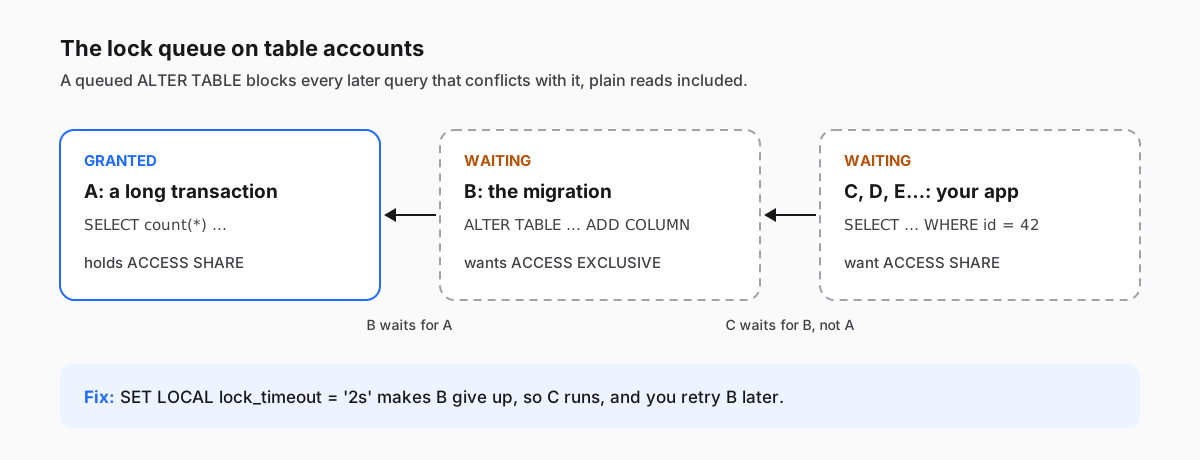
In our run, session A committed eight seconds after it started, B then finished at once, and C's one-row lookup took 6.2 seconds. Under real traffic, every request that touches accounts in that window piles up, connection pools run out, and the outage looks like it was caused by a one-line migration. It was, but not because the migration was slow.
lock_timeout cancels a statement that has waited longer than the limit for a lock. Run the same experiment, but give session B two seconds:
-- Session B
SET application_name = 'b_migration';
SET lock_timeout = '2s';
ALTER TABLE accounts ADD COLUMN note text;ERROR: canceling statement due to lock timeoutThis time C waited at most two seconds (1.8 seconds in our run, instead of 6.2): it waited only until B reached its limit and left the queue. The migration failed, which is the point: it failed cheaply instead of taking the table down. Now you retry it.
Two details make this work in practice.
Use SET LOCAL inside the migration's transaction. SET LOCAL lasts until the end of the current transaction and then reverts, so it cannot leak into whatever runs on that connection next:
BEGIN;
SET LOCAL lock_timeout = '2s';
ALTER TABLE orders
  ADD CONSTRAINT orders_account_fk
  FOREIGN KEY (account_id) REFERENCES accounts (id) NOT VALID;
COMMIT;
This matters if your migrations go through a pooler in transaction mode. Each transaction may land on a different server connection, so a plain SET from a previous transaction is not guaranteed to apply to the ALTER TABLE. Relyt One's pooled connection string goes through PgBouncer with transaction-level pooling. Run migrations over the direct connection string, and keep the setting inside the transaction anyway.
Retry with a backoff, but only on lock timeouts. Many migration tools can retry; if yours does not, a small wrapper is enough. This one retries only when the migration gave up waiting for a lock, stops at the first success, and fails after five attempts. Any other error, such as a typo in the SQL, fails at once. It matches the English error text, so keep lc_messages in English for the migration session:
#!/usr/bin/env bash
# Usage: ./migrate.sh migration.sql
# Retries only when the migration gave up waiting for a lock.
set -u
for attempt in 1 2 3 4 5; do
  if output=$(psql "$DATABASE_URL" -X -v ON_ERROR_STOP=1 -f "$1" 2>&1); then
    echo "$output"
    exit 0
  fi
  echo "$output" >&2
  if ! grep -q "canceling statement due to lock timeout" <<<"$output"; then
    exit 1  # any other error: fix it, don't retry it
  fi
  if [ "$attempt" -lt 5 ]; then
    echo "attempt $attempt hit the lock timeout; retrying in $((attempt * 5))s" >&2
    sleep $((attempt * 5))
  fi
done
echo "giving up after 5 attempts" >&2
exit 1
We saved the foreign key migration above as 0042_orders_account_fk.sql and ran the wrapper while another session held an open transaction that had updated a row in accounts. The first attempt hit the timeout, the second succeeded once that transaction committed:
BEGIN
SET
psql:0042_orders_account_fk.sql:5: ERROR:  canceling statement due to lock timeout
attempt 1 hit the lock timeout; retrying in 5s
BEGIN
SET
ALTER TABLE
COMMIT
Because the file wraps everything in one transaction, a failed attempt rolls back completely, and the retry starts clean. Only retry files like this. A statement that cannot run in a transaction, such as CREATE INDEX CONCURRENTLY, can leave something behind when it fails (more on that below), so the next attempt would trip over it.
Before a migration on a busy table, it is also worth looking for the transaction that will block it:
SELECT pid, state, now() - xact_start AS xact_age, left(query, 50) AS query
FROM pg_stat_activity
WHERE xact_start IS NOT NULL
  AND pid <> pg_backend_pid()
ORDER BY xact_start
LIMIT 5;
A transaction that has been open for minutes, especially one in the idle in transaction state, will make every attempt time out. idle_in_transaction_session_timeout (off by default) ends such sessions automatically.
You can measure this yourself. Run the statement inside a transaction, read pg_locks before committing, and roll back. To see whether Postgres rewrote the table, compare its file node before and after: a rewrite writes a new copy of the table into a new file.
CREATE VIEW my_locks AS
SELECT relation::regclass AS table_name, mode
FROM pg_locks
WHERE pid = pg_backend_pid()
  AND locktype = 'relation'
  AND relation IN ('accounts'::regclass, 'orders'::regclass)
ORDER BY 1, 2;

BEGIN;
SELECT pg_relation_filenode('accounts') AS before \gset
ALTER TABLE accounts ALTER COLUMN score TYPE bigint;
SELECT * FROM my_locks;
SELECT pg_relation_filenode('accounts') <> :before AS rewritten;
ROLLBACK; table_name | mode
------------+---------------------
accounts | AccessExclusiveLock
accounts | ShareLock
(2 rows)
rewritten
-----------
t
(1 row)(\gset is a psql command that stores the result in a variable.) We ran every statement in the table below this way on the one-million-row accounts table and the two-million-row orders table. For the "blocks" columns, we held each lock in an open transaction and tried a one-row SELECT and a one-row UPDATE from another session with a 500 ms lock_timeout; for the rest, the effect follows from the lock mode in the PostgreSQL conflict table.
| Migration | Lock on the table | Blocks reads | Blocks writes | Rewrites the table | Time on our test table |
|---|---|---|---|---|---|
ADD COLUMN note text | ACCESS EXCLUSIVE | yes | yes | no | under 1 ms |
ADD COLUMN status text NOT NULL DEFAULT 'active' | ACCESS EXCLUSIVE | yes | yes | no | under 1 ms |
ADD COLUMN added_at timestamptz DEFAULT now() | ACCESS EXCLUSIVE | yes | yes | no | under 10 ms |
ADD COLUMN token uuid DEFAULT gen_random_uuid() | ACCESS EXCLUSIVE | yes | yes | yes | 3.4 s |
ALTER COLUMN score TYPE bigint (from integer) | ACCESS EXCLUSIVE | yes | yes | yes | 2.5 s |
ALTER COLUMN plan TYPE varchar(50) (from varchar(20)) | ACCESS EXCLUSIVE | yes | yes | no | 2 ms |
ALTER COLUMN plan TYPE text (from varchar(20)) | ACCESS EXCLUSIVE | yes | yes | no | under 1 ms |
ALTER COLUMN plan TYPE varchar(10) (from varchar(20)) | ACCESS EXCLUSIVE | yes | yes | yes | 2.3 s |
ALTER COLUMN plan SET NOT NULL | ACCESS EXCLUSIVE | yes | yes | no, but scans it | 0.24 s |
DROP COLUMN, RENAME COLUMN | ACCESS EXCLUSIVE | yes | yes | no | under 5 ms |
ADD CONSTRAINT … CHECK (…) NOT VALID | ACCESS EXCLUSIVE | yes | yes | no | 13 ms |
VALIDATE CONSTRAINT (the check) | SHARE UPDATE EXCLUSIVE | no | no | no, but scans it | 78 ms |
CREATE INDEX | SHARE | no | yes | no | 1.4 s |
CREATE INDEX CONCURRENTLY | SHARE UPDATE EXCLUSIVE | no | no | no | slower than CREATE INDEX |
ALTER COLUMN … SET STATISTICS | SHARE UPDATE EXCLUSIVE | no | no | no | under 1 ms |
Foreign keys lock two tables, so they get their own table. orders is the referencing table and accounts the referenced one:
| Migration | Lock on orders | Lock on accounts | Blocks writes on | Time |
|---|---|---|---|---|
ADD FOREIGN KEY | SHARE ROW EXCLUSIVE | SHARE ROW EXCLUSIVE | both tables | 1.8 s (checks every row) |
ADD FOREIGN KEY … NOT VALID | SHARE ROW EXCLUSIVE | SHARE ROW EXCLUSIVE | both tables | 3 ms (checks only new rows) |
VALIDATE CONSTRAINT (the foreign key) | SHARE UPDATE EXCLUSIVE | ROW SHARE | neither | 1.2 s |
The times come from a local container and scale with table size and hardware, so read them as relative, not absolute. A few things in these tables surprise people:
- Every statement here that adds, drops, renames or retypes a column takes
ACCESS EXCLUSIVE, including the instant ones. "Instant" describes how long the lock is held, not whether it is needed. All of them can start a lock queue. - A default does not mean a rewrite. Since PostgreSQL 11, a non-volatile default is stored once in the catalog and existing rows pick it up when they are read.
now()counts as non-volatile here: it is evaluated once, when theALTER TABLEruns, and every existing row gets that same timestamp. A volatile default such asgen_random_uuid()orclock_timestamp()needs a different value per row, so the table is rewritten. - Widening a
varcharis free, narrowing it is not. Going fromvarchar(20)tovarchar(50)or totextonly changes the catalog. Going tovarchar(10)rewrote the table on PostgreSQL 17. integertobigintalways rewrites. The values change size on disk. On a big table, this is the migration that most needs a plan: add a newbigintcolumn, backfill it in batches, and switch over in a short transaction.- A foreign key blocks writes on the table it points to, not only on the table you are altering. Adding one to
ordersstoppedUPDATEs onaccountstoo. CREATE INDEXlets reads through but blocks writes for as long as the build runs.
ADD CONSTRAINT normally checks every existing row while it holds its lock. NOT VALID skips that check: the constraint applies to new and updated rows straight away, and the old rows are checked later by VALIDATE CONSTRAINT, which takes a much weaker lock. In the tables above, adding the foreign key directly blocked writes on both tables for 1.8 seconds. Split in two, the blocking part took 3 ms, and the 1.2-second validation let both reads and writes through.
Migration 1 is the file from Fix 1; if you ran it there, only migration 2 is left:
-- Migration 1: quick, but still needs its lock, so keep the lock_timeout
BEGIN;
SET LOCAL lock_timeout = '2s';
ALTER TABLE orders
  ADD CONSTRAINT orders_account_fk
  FOREIGN KEY (account_id) REFERENCES accounts (id) NOT VALID;
COMMIT;

-- Migration 2: scans the table, without blocking reads or writes
ALTER TABLE orders VALIDATE CONSTRAINT orders_account_fk;
If VALIDATE finds a row that breaks the constraint, it fails, and the constraint stays NOT VALID while still enforcing new writes. Fix the data and validate again.
On PostgreSQL 17, SET NOT NULL has no NOT VALID form, and it scans the whole table under ACCESS EXCLUSIVE. But it skips the scan if a validated CHECK constraint already proves that the column has no nulls. You can see the decision with client_min_messages = debug1:
ALTER TABLE accounts ADD CONSTRAINT plan_not_null CHECK (plan IS NOT NULL) NOT VALID;
ALTER TABLE accounts VALIDATE CONSTRAINT plan_not_null;

SET client_min_messages = debug1;
ALTER TABLE accounts ALTER COLUMN plan SET NOT NULL;
RESET client_min_messages;

ALTER TABLE accounts DROP CONSTRAINT plan_not_null;DEBUG: existing constraints on column "accounts.plan" are sufficient to prove that it does not contain nullsWithout the check constraint, the same statement prints DEBUG: verifying table "accounts" instead, which is the full scan. Once the column is NOT NULL, the check constraint is redundant and you can drop it.
PostgreSQL 18 makes this shorter. It accepts ALTER TABLE accounts ADD CONSTRAINT plan_nn NOT NULL plan NOT VALID, and we checked on 18.6 that the later VALIDATE CONSTRAINT takes SHARE UPDATE EXCLUSIVE. PostgreSQL 17 rejects that statement with a syntax error, so on Relyt One use the CHECK route above.
CREATE INDEX CONCURRENTLY takes SHARE UPDATE EXCLUSIVE instead of SHARE, so writes keep flowing while it builds. In exchange, the documentation explains, it scans the table twice and waits for existing transactions that could use or modify the index, so it does more work and takes longer. It also has two rules of its own.
It cannot run inside a transaction block:
BEGIN;
CREATE INDEX CONCURRENTLY accounts_email_idx ON accounts (email);
ROLLBACK;ERROR: CREATE INDEX CONCURRENTLY cannot run inside a transaction blockMany migration tools wrap each file in a transaction, so check how yours disables that for a single migration. It still waits for its lock, so give it a timeout too. SET LOCAL does nothing outside a transaction (Postgres answers WARNING: SET LOCAL can only be used in transaction blocks), so use a session-level SET lock_timeout = '2s'; just before it, on a direct connection.
And if it fails, it leaves an invalid index behind. A unique index on a column with duplicates is an easy way to see this:
CREATE UNIQUE INDEX CONCURRENTLY accounts_plan_key ON accounts (plan);
SELECT indexrelid::regclass AS index_name, indisvalid
FROM pg_index WHERE indrelid = 'accounts'::regclass;ERROR: could not create unique index "accounts_plan_key"
DETAIL: Key (plan)=(free) is duplicated.
index_name | indisvalid
-------------------+------------
accounts_pkey | t
accounts_plan_key | f
(2 rows)(The duplicated value in the DETAIL line can differ between runs.) The invalid index is never used for queries. Depending on which phase of the build failed, writes may still have to maintain it (check indisready in the same catalog). A concurrent build that gives up on its lock_timeout leaves an invalid index too: when we ran one against a table with a long-running write transaction, it timed out and left indisvalid = f behind. Whatever the cause, drop the index with DROP INDEX CONCURRENTLY accounts_plan_key; and try again.
- Look up the statement in the tables above. If it takes
ACCESS EXCLUSIVE, or any lock that blocks writes (SHARE,SHARE ROW EXCLUSIVE), it needs a lock timeout, however fast it is. - Start the migration's transaction with
SET LOCAL lock_timeout = '2s'(or whatever your app can tolerate as a pause), and retry when it times out. - Check
pg_stat_activityfor long-running andidle in transactionsessions before you start. - Add foreign keys and check constraints
NOT VALID, thenVALIDATEthem in a separate step. - Add
NOT NULLthrough a validatedCHECKconstraint on PostgreSQL 17. - Build and drop indexes
CONCURRENTLY, outside a transaction, with a session-levelSET lock_timeout, and look forindisvalid = falseafterwards. - Treat anything that rewrites the table (
integertobigint, a volatile default, narrowing a type) as a project, not a migration. - Run migrations over a direct connection, not through a transaction pooler.
The tables above tell you which lock a statement takes. They cannot tell you how long the scan or rewrite takes on your data, or whether your data passes the VALIDATE step. For that you need production-sized data, and a copy is usually the hard part.
On Relyt One every branch is a copy-on-write fork of its parent with the full data set, with its own compute. Create a branch from your production branch, run the migration file there with \timing on, use the file node check from above to see whether it rewrites the table, and find out whether VALIDATE fails on old rows before you run it for real. Then delete the branch. Production never sees the experiment.
One thing a branch cannot rehearse is the lock queue itself, because nothing else is running there. It tells you how long the migration holds its lock once it has it; lock_timeout and retries are still what protect you from waiting for the lock in production. And compare relative timings, not absolute ones: the branch's compute may be sized differently from production.
TagsPostgresmigrationslocksschema


