
Postgres as a job queue: FOR UPDATE SKIP LOCKED, done right
How to build a background job queue in PostgreSQL 17 with SELECT ... FOR UPDATE SKIP LOCKED: why the naive SELECT-then-UPDATE claims the same job twice, why FOR UPDATE alone makes workers wait, leases and retries, LISTEN/NOTIFY, vacuum, and what polling workers do to a serverless compute. Every statement reproduced on Postgres 17.11.
On this page

You don't need Redis or a message broker to run background jobs. A Postgres table and FOR UPDATE SKIP LOCKED will hand each job to one worker at a time, survive crashes, and keep the job in the same transaction as the data it belongs to. The catch is that the obvious first version is wrong: in our test, eight workers running a plain "select the oldest job, then update it" claimed the same rows up to eight times and finished about 2,100 of 10,000 jobs. This post reproduces that bug, builds the queue that fixes it (claim, complete, retry, reclaim), and covers the parts that bite later: transactions held open during work, LISTEN/NOTIFY, vacuum, and what polling workers do to a compute that suspends when idle. Every statement and every output below comes from a local PostgreSQL 17.11, the major version Relyt One runs.
| Symptom | Cause | Fix |
|---|---|---|
| Two workers run the same job | UPDATE ... WHERE id = (SELECT ... LIMIT 1) without row locks | Lock the rows you pick: FOR UPDATE SKIP LOCKED |
| Workers take turns instead of running in parallel | FOR UPDATE without SKIP LOCKED: each worker waits for the one in front | Add SKIP LOCKED |
| Vacuum stops cleaning up, the table grows | A worker keeps its transaction open while the job runs | Claim in a short transaction and record a lease |
A job stays running forever after a crash | Nothing reclaims it | Expire the lease and put the job back |
| A stale worker marks a reclaimed job done | Completion doesn't check who owns the job | Fence the completion with the attempt number |
| The serverless compute never suspends | A worker polls every few seconds | Pick a polling strategy on purpose (see the last section) |
One table, one row per job. The partial index covers only the rows workers look for, so it stays small even when the table holds a long history of finished jobs.
CREATE TABLE jobs (
  id           bigint GENERATED ALWAYS AS IDENTITY PRIMARY KEY,
  queue        text        NOT NULL DEFAULT 'default',
  payload      jsonb       NOT NULL,
  status       text        NOT NULL DEFAULT 'queued'
               CHECK (status IN ('queued', 'running', 'done', 'failed')),
  run_at       timestamptz NOT NULL DEFAULT now(),
  attempts     int         NOT NULL DEFAULT 0,
  max_attempts int         NOT NULL DEFAULT 5,
  locked_until timestamptz,
  last_error   text,
  created_at   timestamptz NOT NULL DEFAULT now()
);

CREATE INDEX jobs_ready_idx ON jobs (queue, run_at) WHERE status = 'queued';

INSERT INTO jobs (payload)
SELECT jsonb_build_object('email_id', g) FROM generate_series(1, 10) AS g;
run_at doubles as the retry schedule: a job is ready when it is queued and run_at <= now(). locked_until is the lease, which we'll get to.
This is the version most people write first. It looks atomic because it is one statement:
UPDATE jobs
SET status = 'running', attempts = attempts + 1
WHERE id = (
  SELECT id FROM jobs
  WHERE status = 'queued'
  ORDER BY run_at
  LIMIT 1
)
RETURNING id, attempts;
Run it in two sessions at once. Session A runs it inside a transaction and is still working when session B runs the same statement:
-- session A (inside BEGIN, not committed yet)
 id | attempts
----+----------
  1 |        1

-- session B, returns after A commits
 id | attempts
----+----------
  1 |        2
Both sessions claimed job 1, and job 2 is still queued. Here is why. The subquery runs once, sees job 1 as the oldest queued job, and hands the outer UPDATE the value id = 1. B then has to wait for A's row lock. In READ COMMITTED, once A commits, Postgres re-evaluates the WHERE clause against the new version of the row. The only condition left is id = 1, which still matches, so B updates the job A already took.
Two sessions in a lab is one thing, so we ran eight workers with pgbench against 10,000 queued jobs, 1,250 claims per worker:
pgbench -n -c 8 -j 8 -t 1250 -f naive.sql postgresnaive.sql is the statement above with status = 'done', so each claim is also a completion. Afterwards:
 status | count | max_attempts
--------+-------+--------------
 done   |  2100 |            8
 queued |  7900 |            0
10,000 claims finished about 2,100 jobs (between 2,068 and 2,137 across eight runs on two machines), and some jobs were claimed by all eight workers. In a real system that is eight copies of the same email.
Locking the rows you select fixes the double claim. Put the pick in a CTE with FOR UPDATE and update through it:
WITH next AS (
  SELECT id FROM jobs
  WHERE queue = 'default' AND status = 'queued' AND run_at <= now()
  ORDER BY run_at
  LIMIT 1
  FOR UPDATE
)
UPDATE jobs j
SET status = 'running', attempts = j.attempts + 1
FROM next
WHERE j.id = next.id
RETURNING j.id;
Now session B blocks on job 1. When A commits, Postgres rechecks job 1, sees it no longer matches status = 'queued', drops it and moves on to job 2. That is correct, but look at B's timing:
 id
----
  2
(1 row)

UPDATE 1
Time: 1858.126 ms (00:01.858)
B waited the whole time A held its transaction open. With more workers they line up behind the same first row and run one at a time.
Add two words. From the SELECT reference: "With SKIP LOCKED, any selected rows that cannot be immediately locked are skipped." The docs also say what that's for: it gives an inconsistent view of the data, so it is not for general-purpose work, "but can be used to avoid lock contention with multiple consumers accessing a queue-like table."
With A still holding job 1, B gets job 2 immediately:
 id
----
  2
(1 row)

UPDATE 1
Time: 2.512 ms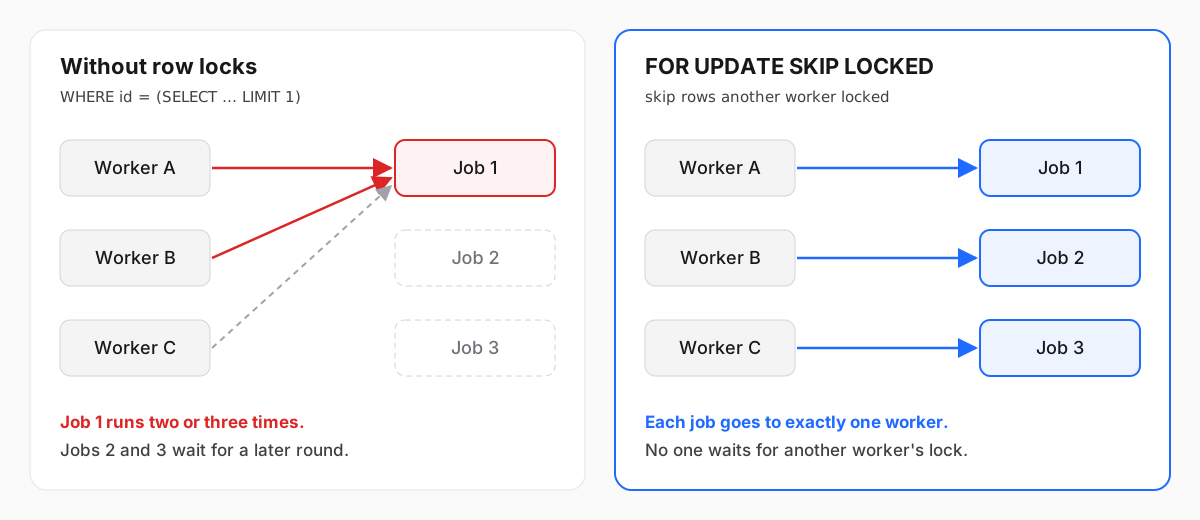
The same pgbench run with SKIP LOCKED instead of the naive statement:
 status | count | max_attempts
--------+-------+--------------
 done   | 10000 |            1
Every job done, every job exactly once.
Here is the claim we'll use from now on. It takes up to 10 jobs per round trip, which matters once each job is quick, and writes a lease:
WITH next AS (
  SELECT id FROM jobs
  WHERE queue = 'default' AND status = 'queued' AND run_at <= now()
  ORDER BY run_at
  LIMIT 10
  FOR UPDATE SKIP LOCKED
)
UPDATE jobs j
SET status       = 'running',
    attempts     = j.attempts + 1,
    locked_until = now() + interval '5 minutes'
FROM next
WHERE j.id = next.id
RETURNING j.id, j.payload, j.attempts;
On a table with a few thousand rows, EXPLAIN (COSTS OFF) shows the shape you want: Limit over LockRows over an index scan on jobs_ready_idx, so a worker only touches ready rows and stops after 10.
 Update on jobs j
   CTE next
     ->  Limit
           ->  LockRows
                 ->  Index Scan using jobs_ready_idx on jobs
                       Index Cond: ((queue = 'default'::text) AND (run_at <= now()))
                       Filter: (status = 'queued'::text)
   ->  Nested Loop
         ->  CTE Scan on next
         ->  Index Scan using jobs_pkey on jobs j
Index Cond: (id = next.id)There are two ways to use that claim:
- Lock while working.
BEGIN, claim, do the work, mark it done,COMMIT. A crash rolls back and the job is free again, which is attractive. - Lease. Claim and
COMMITright away withstatus = 'running'andlocked_until. Do the work outside any transaction. Mark it done in a second short transaction.
The first one is fine for jobs that take milliseconds. For anything that calls an API, sends email or renders a file, use the lease. A transaction that has written something (a claim has) and then sits waiting is idle in transaction, and while it is open, vacuum cannot remove row versions that became dead after it started, in any table of that database. A REPEATABLE READ transaction left open does the same even if it only read.
We held one claim open that way, let other workers process 2,000 jobs, and ran VACUUM (VERBOSE) jobs:
tuples: 0 removed, 11992 remain, 2000 are dead but not yet removableAfter the open transaction committed, the same command:
tuples: 2001 removed, 8542 remain, 0 are dead but not yet removableA queue table is all updates and deletes, so it is the first table to bloat when vacuum is held back. An open transaction also holds a server connection, and if you are behind a pooler in transaction mode that connection is out of the pool until you commit. Short transactions avoid both.
With leases, a job's whole lifecycle is four short statements. The ones a worker runs after the claim check status = 'running' and attempts, the value the claim returned, so a worker can only change a job it still owns.
Complete. The worker passes back the id and attempt number it got from the claim:
UPDATE jobs
SET status = 'done', locked_until = NULL
WHERE id = 1 AND status = 'running' AND attempts = 1;
Fail and retry with backoff. 20 seconds after the first failure, 40 after the second, doubling up to a cap of an hour, and failed for good after max_attempts. With the default of 5 attempts the longest wait is 160 seconds; the cap only matters if you raise max_attempts.
UPDATE jobs
SET status       = CASE WHEN attempts >= max_attempts THEN 'failed' ELSE 'queued' END,
    run_at       = now() + least(interval '1 hour', interval '10 seconds' * 2 ^ attempts),
    locked_until = NULL,
    last_error   = 'SMTP 451: try again later'
WHERE id = 2 AND status = 'running' AND attempts = 1
RETURNING id, status, attempts, run_at - now() AS retry_in; id | status | attempts | retry_in
----+--------+----------+----------
2 | queued | 1 | 00:00:20Reclaim expired leases. If a worker dies mid-job, its lease runs out and any worker (or a cron job) puts the job back. A job that kills its worker every time would otherwise come back forever, so the reaper also respects max_attempts:
UPDATE jobs
SET status       = CASE WHEN attempts >= max_attempts THEN 'failed' ELSE 'queued' END,
    locked_until = NULL,
    last_error   = coalesce(last_error, 'lease expired')
WHERE status = 'running' AND locked_until < now()
RETURNING id, status, attempts;
Why the attempt check matters. Say the worker on job 3 wasn't dead, just slow. Its lease expired, the reaper put the job back, and another worker claimed it, so attempts is now 2. When the slow worker finally finishes and runs its completion with attempts = 1, nothing happens:
UPDATE 0The job stays with its current owner. Without the check, the slow worker would mark the job done while the second worker is still running it. Your work should still be idempotent, because the slow worker's side effects already happened. The check just keeps the job's state honest.
Pick a lease longer than your slowest normal job, or have long jobs extend their own lease as they go, and stop if the extension updates no row, because the job is no longer theirs:
UPDATE jobs
SET locked_until = now() + interval '5 minutes'
WHERE id = $1 AND status = 'running' AND attempts = $2;Workers need to find out there is work. The simplest way is to run the claim in a loop and sleep when it returns nothing. The alternative is to have Postgres tell them:
CREATE FUNCTION jobs_notify() RETURNS trigger
LANGUAGE plpgsql AS $$
BEGIN
  PERFORM pg_notify('jobs', NEW.queue);
  RETURN NULL;
END;
$$;

CREATE TRIGGER jobs_notify
AFTER INSERT ON jobs
FOR EACH ROW EXECUTE FUNCTION jobs_notify();
A worker runs LISTEN jobs and claims when a notification arrives. Three properties from the NOTIFY reference shape how you use it:
- Delivery happens at commit. Inside a transaction, notifications "are not delivered until and unless the transaction is committed." In our test the producer inserted a job at 13:08:30 and committed at 13:08:33. The listener's check at 13:08:31 saw nothing, and the notification showed up on its next check. That's what you want, because a worker woken early would find a job it can't see yet.
- Notifications are not a queue. Only sessions that are listening at that moment get them, and identical notifications in one transaction are folded into one. Treat a notification as "go look", never as the job itself, and keep a slower poll as a fallback for anything you missed while reconnecting.
- Payloads are small. In the default configuration the payload must be shorter than 8000 bytes. Send the queue name or an id, not the job.
One more: LISTEN belongs to a server connection, so it needs a direct connection, not one through a transaction-mode pooler. We covered why in What breaks behind PgBouncer transaction pooling. Producers and the claim queries can use the pooled connection.
On Relyt One, a compute that has had nothing to do for about ten minutes suspends, and the next connection resumes it. For a queue, what matters is what counts as "something to do". The compute's activity monitor checks client sessions every half second:
- any session that is not
idle(running a query, oridle in transaction) counts as activity right now; - an
idlesession counts as activity as of its last state change, that is, when its last query finished; - a running autovacuum worker, or an active logical replication connection, also keeps the compute awake.
So a worker that polls every second, or every five minutes, keeps the compute awake around the clock, even if the queue is empty all night. A worker that holds a transaction open while it works keeps it awake for the whole job. An idle connection on its own does not, because its last state change keeps getting older. Three things follow. A suspend closes every connection, including a LISTEN one, and a worker that reconnects right away resumes the compute. Health-check queries from a driver or pool count as activity. And a fallback poll that runs more often than every ten minutes keeps the compute on.
That gives you three honest options:
- Jobs must start within seconds. Accept an always-on compute while workers run. That's the cost of low latency on any platform. Poll at an interval you can live with, or use
LISTENwith a fallback poll. - Jobs can wait a while. Don't run workers around the clock. Start them on a schedule that leaves gaps longer than the idle timeout, have them drain the queue with the batch claim and exit. Between runs the compute can suspend, and the first connection of the next run resumes it.
- Jobs come from your own app. Have the request that enqueues a job also kick a worker (a serverless function, a task in your platform's job runner). The database stays the source of truth for state, retries and leases, and nothing has to poll.
Branches help here too. Each branch has its own compute, so you can point a test fleet of workers at a branch with a copy of production data, hammer the claim query, and leave the production compute alone.
Finished jobs don't need to stay in the hot table. Delete them in batches, or move them to an archive table, on a schedule:
DELETE FROM jobs
WHERE id IN (
  SELECT id FROM jobs
  WHERE status = 'done' AND created_at < now() - interval '7 days'
  LIMIT 10000
);
Every claim, completion and retry writes a new row version, so the table produces dead tuples steadily. Watch n_dead_tup and last_autovacuum in pg_stat_user_tables for jobs, and keep transactions short so vacuum can actually remove what it finds.
A jobs table is a good fit when jobs relate to rows in the same database, throughput is in the range of an UPDATE per job, and you want enqueueing to be part of the same transaction as the data change. That last part is something an external broker can't give you without extra machinery. It's a poor fit for fan-out to many independent consumers, for retaining a stream to replay later, or for volumes where the update churn itself becomes the bottleneck. Use a broker or a log for those.
- Claim with a CTE and
FOR UPDATE SKIP LOCKED, neverWHERE id = (SELECT ... LIMIT 1)without locks - Use a partial index on the ready condition
- Claim and commit right away; record
locked_until; do the work outside the transaction - Complete, fail and extend with
WHERE id = $1 AND status = 'running' AND attempts = $2, and check the row count - Run a reaper for expired leases; cap retries with
max_attempts - Use
LISTENon a direct connection, treat notifications as hints, keep a fallback poll - Delete or archive finished jobs; watch
n_dead_tup - Decide how workers wait, knowing what keeps a serverless compute awake
Every statement in this post is plain PostgreSQL 17 SQL with no extensions. Create a free Relyt One project, open a branch, and point two psql sessions at it to watch SKIP LOCKED hand them different rows.


