
Why Postgres IDs skip numbers, and how to fix "duplicate key" errors after an import
Where gaps in PostgreSQL serial and identity columns come from (rollbacks, ON CONFLICT, crashes, CACHE), why inserts fail with duplicate key value violates unique constraint after a data import, one query that resets every sequence, running out of integer IDs, and gapless invoice numbers. Every statement reproduced on Postgres 17.11.
On this page

Two questions about Postgres IDs come up again and again. "Why did my IDs jump from 5 to 34?" and "Why does every insert fail with duplicate key value violates unique constraint \"..._pkey\" right after I imported my data?" Both come from the same object: the sequence behind your serial or identity column. A sequence hands out numbers without caring whether you use them, so gaps are normal. And it only knows the numbers it handed out itself, so rows you load with explicit IDs leave it behind. This post reproduces each kind of gap, fixes the import error for one table and then for every table at once, shows what happens when an integer ID runs out, and builds gapless numbering for the one place you may actually need it. Every statement and every output below comes from a local PostgreSQL 17.11, the major version Relyt One runs.
| Symptom | Cause | Fix |
|---|---|---|
| IDs skip a few numbers | Rolled-back or failed inserts, ON CONFLICT | Nothing. Sequences are not gapless by design |
| IDs jump by up to 32 after a crash (with the default cache) | Sequences log values ahead in the WAL | Nothing. Don't give meaning to ID values |
| IDs from different sessions interleave or jump by the cache size | CACHE greater than 1 | Use the default CACHE 1 if order matters |
duplicate key value violates unique constraint after an import | Rows were loaded with explicit IDs; the sequence still starts at 1 | Move the sequence past max(id) with setval |
nextval: reached maximum value of sequence | A serial column is a 32-bit integer | Change the sequence and the column to bigint |
| You need invoice numbers with no gaps | Sequences can't give you that | A counter row updated in the same transaction |
The PostgreSQL documentation is blunt about it: the value nextval returns "is not reclaimed for re-use if the calling transaction later aborts", and "sequence objects cannot be used to obtain 'gapless' sequences." That is a deliberate trade. If a rolled-back transaction could give its number back, every other transaction asking for a number would have to wait to see whether it did. Here is how the gaps appear in practice.
CREATE TABLE orders (
  id    bigint GENERATED ALWAYS AS IDENTITY PRIMARY KEY,
  email text NOT NULL UNIQUE
);

INSERT INTO orders (email) VALUES ('a@example.com');           -- takes 1

BEGIN;
INSERT INTO orders (email) VALUES ('b@example.com');           -- takes 2
ROLLBACK;                                                      -- 2 is gone

INSERT INTO orders (email) VALUES ('c@example.com');           -- takes 3
INSERT INTO orders (email) VALUES ('a@example.com')
  ON CONFLICT (email) DO NOTHING;                              -- burns 4
INSERT INTO orders (email) VALUES ('a@example.com');           -- burns 5, fails
INSERT INTO orders (email) VALUES ('d@example.com');           -- takes 6

SELECT id, email FROM orders ORDER BY id; id | email
----+---------------
1 | a@example.com
3 | c@example.com
6 | d@example.com
(3 rows)Three rows, three gaps. The rolled-back insert took 2. The insert that failed on the unique email constraint took 5 before it failed: Postgres builds the whole row, including the default ID, before it checks constraints. ON CONFLICT DO NOTHING took 4 without inserting anything, for the same reason. The documentation says it explicitly: INSERT ... ON CONFLICT computes the row, "including doing any required nextval calls, before detecting any conflict." If your app upserts the same rows over and over, the sequence can climb much faster than the row count. (We covered upserts in detail in INSERT ... ON CONFLICT vs MERGE.)
Writing a WAL record for every nextval would be slow, so Postgres logs a sequence ahead: when it writes a record, it records a value 32 numbers further on and hands out the numbers in between without logging again. The constant is SEQ_LOG_VALS in the server source, and the comment next to it says: "In the event of crash we can lose (skip over) as many values as we pre-logged."
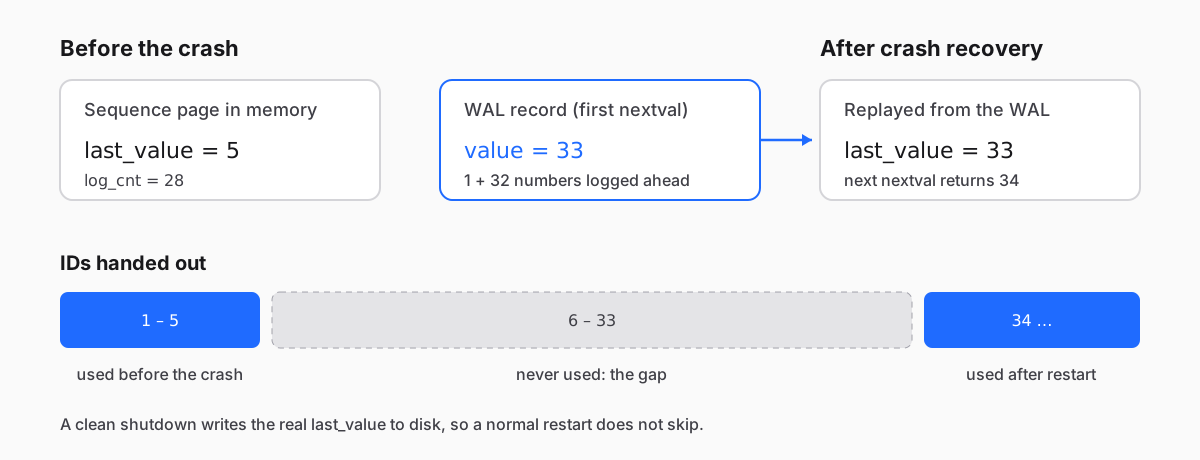
You can watch it happen. log_cnt is how many pre-logged values are left:
CREATE TABLE events (
  id   bigint GENERATED ALWAYS AS IDENTITY PRIMARY KEY,
  note text
);
INSERT INTO events (note) SELECT 'before crash' FROM generate_series(1, 5);
SELECT last_value, log_cnt FROM events_id_seq; last_value | log_cnt
------------+---------
5 | 28
(1 row)Now crash the server without a clean shutdown (pg_ctl stop -m immediate), start it again, and insert one more row:
LOG: database system was not properly shut down; automatic recovery in progressINSERT INTO events (note) VALUES ('after crash') RETURNING id; id
----
34
(1 row)Recovery replayed the WAL, the WAL said 33, so the next ID is 34. Numbers 6 through 33 were never used. Postgres also writes a fresh 32-value record on the first nextval after each checkpoint, so how many numbers you lose depends on where in that window the crash lands. The 32 is on top of the cache: a sequence with CACHE 20 (next section) logs 20 + 32 values ahead and can lose that many.
A clean shutdown writes the real state to disk, and in our test a normal restart continued at the next number. That was a plain Postgres server we stopped ourselves; how restarts happen on a managed service is up to the service, so treat any restart as a possible jump.
A sequence created with CACHE 20 gives each session 20 numbers at a time. Numbers a session doesn't use are lost when it disconnects:
CREATE SEQUENCE ticket_seq CACHE 20;
SELECT nextval('ticket_seq');    -- session 1 reserves 1..20
\c
SELECT nextval('ticket_seq'); -- session 2 reserves 21..40 nextval
---------
1
(1 row)
You are now connected to database "postgres" as user "postgres".
nextval
---------
21
(1 row)With a cache, the documentation also warns that numbers from different sessions are no longer handed out in time order: session A gets 1, session B then gets 21, and only after that does A get 2. The default is CACHE 1, which is what serial and identity columns use unless you change it.
None of these gaps is a bug, and none of them needs fixing. The fix is in your head: an ID says "this row is different from that one", not "this was the 6th order" or "there are 6 orders".
This one is a real bug, and it usually shows up the first day after a move: you exported a table from one database, loaded it into another, and the app's first insert fails. Here is the whole thing in three statements:
CREATE TABLE customers (
  id   serial PRIMARY KEY,
  name text NOT NULL
);

-- what a CSV import, an ORM seed or a copy from another database does:
COPY customers (id, name) FROM stdin;
1	Ada
2	Grace
3	Edsger
\.

INSERT INTO customers (name) VALUES ('Barbara');ERROR: duplicate key value violates unique constraint "customers_pkey"
DETAIL: Key (id)=(1) already exists.The rows carry their own IDs, so COPY never called nextval. The sequence still thinks nothing has been handed out, gives the new row 1, and the primary key rejects it. Identity columns behave the same way: COPY writes the IDs in the input even into a GENERATED ALWAYS column, "like the INSERT option OVERRIDING SYSTEM VALUE", and the sequence is not moved.
A detail that makes this confusing: each failed insert still consumes a number. Retry three times and the fourth insert succeeds, because the sequence has finally walked past the imported IDs. That is why the error sometimes "fixes itself" in development, where you imported three rows, and not in production, where you imported three million.
Move the sequence to the highest ID in the table. pg_get_serial_sequence finds the sequence behind a serial or identity column, so you don't need to guess its name:
SELECT pg_get_serial_sequence('customers', 'id');
SELECT setval(pg_get_serial_sequence('customers', 'id'), max(id)) FROM customers;
INSERT INTO customers (name) VALUES ('Barbara') RETURNING id; pg_get_serial_sequence
-------------------------
public.customers_id_seq
(1 row)
setval
--------
3
(1 row)
id
----
4
(1 row)Two things go wrong with this one-liner. On an empty table max(id) is NULL, and setval with a NULL argument returns NULL and silently does nothing. And setval(seq, 0) fails, because a sequence's default minimum is 1:
CREATE TABLE audit_log (id bigint GENERATED BY DEFAULT AS IDENTITY PRIMARY KEY);
SELECT setval(pg_get_serial_sequence('audit_log', 'id'), max(id)) FROM audit_log;
SELECT setval(pg_get_serial_sequence('audit_log', 'id'), 0); setval
--------
(1 row)
ERROR: setval: value 0 is out of bounds for sequence "audit_log_id_seq" (1..9223372036854775807)The empty-table form is setval(seq, COALESCE(max(id), 0) + 1, false). The false means "the next nextval returns exactly this value", so an empty table starts at 1.
Also note that setval is not transactional: the documentation says its change is "immediately visible to other transactions, and [is] not undone if the calling transaction rolls back."
After a bulk import you want to do this for every table. This query finds every sequence that belongs to a serial or identity column, builds a setval for each one, and \gexec in psql runs the generated statements. Each setval only moves a sequence forward: it takes whichever is higher, max(id) + 1 or the value the sequence would hand out next. That matters on a database that is already in use. If you deleted the newest rows of a table, max(id) + 1 is lower than the sequence, and moving the sequence back would hand out IDs that were already used once and may still be referenced somewhere else.
SELECT format(
         'SELECT setval(%1$L, GREATEST('
         'COALESCE((SELECT max(%2$I) FROM %3$I.%4$I), 0) + 1, '
         '(SELECT last_value + is_called::int FROM %1$s)), false);',
         s.oid::regclass, a.attname, n.nspname, t.relname)
FROM pg_class s
JOIN pg_depend d    ON d.classid = 'pg_class'::regclass
                   AND d.objid = s.oid
                   AND d.refclassid = 'pg_class'::regclass
                   AND d.deptype IN ('a', 'i')   -- serial / identity
JOIN pg_class t     ON t.oid = d.refobjid
JOIN pg_namespace n ON n.oid = t.relnamespace
JOIN pg_attribute a ON a.attrelid = t.oid AND a.attnum = d.refobjsubid
WHERE s.relkind = 'S'
ORDER BY 1
\gexec
On our test database it generated and ran one statement per table. Here are two of them (output abridged), the empty audit_log and the imported customers:
SELECT setval('audit_log_id_seq', GREATEST(COALESCE((SELECT max(id) FROM public.audit_log), 0) + 1, (SELECT last_value + is_called::int FROM audit_log_id_seq)), false);
 setval
--------
      1
(1 row)

SELECT setval('customers_id_seq', GREATEST(COALESCE((SELECT max(id) FROM public.customers), 0) + 1, (SELECT last_value + is_called::int FROM customers_id_seq)), false);
 setval
--------
      5
(1 row)
Run it after the import and before you let traffic in; a row inserted between max(id) and setval can still collide. Because the sequence's own next value is part of the GREATEST, a sequence with a custom MINVALUE or START above 1 on an empty table stays where it is instead of failing. \gexec keeps going after an error, so run it with \set ON_ERROR_STOP on if you want the first failure to stop the rest. Two cases it does not cover. Sequences that count down (negative INCREMENT) need min and LEAST instead. And a sequence that a column only uses through DEFAULT nextval('some_seq'), without OWNED BY, is not owned by the column: pg_get_serial_sequence returns NULL for it, and the query above skips it. Fix those by hand.
| How the data arrived | Sequences |
|---|---|
pg_dump of the whole database, restored with psql or pg_restore | Set correctly. The dump contains a setval for every sequence |
pg_dump --data-only | Set correctly. Data-only dumps include the setval calls too |
pg_dump -t <table> | Sequences the table owns (serial, identity) are included with their setval. A sequence the table only references through DEFAULT nextval(...) is not: restoring into a database that doesn't have it fails, and in one that does, that sequence is not moved |
COPY or \copy from CSV, ORM seed files, a script that inserts rows with their IDs | Not set. Run the fix above |
| Logical replication | Not set. "Sequence data is not replicated": the subscriber's sequences stay at their start value until you update them before switching over |
TRUNCATE and reload | TRUNCATE does not reset sequences unless you add RESTART IDENTITY; reloading the same IDs is fine, loading new higher ones needs the fix |
We checked each row with pg_dump 17.11. The documentation explains the DEFAULT nextval(...) case: with -t, "pg_dump makes no attempt to dump any other database objects that the selected table(s) might depend upon."
serial creates an integer column and an integer sequence, so it stops at 2,147,483,647. That sounds like a lot until a table that logs events or upserts in bulk burns numbers faster than it stores rows (see the gaps above). Here is what the end looks like:
CREATE TABLE clicks (id serial PRIMARY KEY);
SELECT setval('clicks_id_seq', 2147483646);     -- fast-forward for the demo
INSERT INTO clicks DEFAULT VALUES RETURNING id;
INSERT INTO clicks DEFAULT VALUES RETURNING id; id
------------
2147483647
(1 row)
ERROR: nextval: reached maximum value of sequence "clicks_id_seq" (2147483647)Check how close you are before it happens. pg_sequences shows every sequence with its type and limit:
SELECT schemaname, sequencename, data_type, last_value, max_value,
       round(100.0 * last_value / max_value, 2) AS pct_used
FROM pg_sequences
ORDER BY pct_used DESC NULLS LAST, sequencename
LIMIT 3; schemaname | sequencename | data_type | last_value | max_value | pct_used
------------+------------------+-----------+------------+---------------------+----------
public | clicks_id_seq | integer | 2147483647 | 2147483647 | 100.00
public | ticket_seq | bigint | 40 | 9223372036854775807 | 0.00
public | audit_log_id_seq | bigint | | 9223372036854775807 |
(3 rows)Note ticket_seq at 40: with CACHE 20, last_value includes numbers sessions have reserved but not used yet. And last_value is NULL for a sequence that hasn't handed out a number since a setval(..., false), like the ones the fix above just touched; those sort last.
This query only knows the sequence's own limit. If the sequence is bigint but the column is still integer, the column fails first while the query shows almost 0%. That is exactly the next trap.
Changing only the sequence is not enough, because the column is still an integer:
ALTER SEQUENCE clicks_id_seq AS bigint;
INSERT INTO clicks DEFAULT VALUES RETURNING id;ERROR: integer out of rangeThe column has to change too, with ALTER TABLE clicks ALTER COLUMN id TYPE bigint. On a big table that statement rewrites the whole table while holding an ACCESS EXCLUSIVE lock, which blocks reads and writes for as long as it runs. Our post on migrations that lock your table measures exactly this change. The cheap fix is the one you make on day one: use bigint for IDs.
Sometimes the business needs numbers without holes, invoice numbers being the usual example. A sequence can't do it, so use a row that you update in the same transaction as the insert. Under the default READ COMMITTED isolation level, the row lock makes concurrent transactions take turns, and a rollback undoes the increment along with the invoice:
CREATE TABLE invoice_counters (
  year    int PRIMARY KEY,
  last_no int NOT NULL
);
INSERT INTO invoice_counters VALUES (2026, 0);

CREATE TABLE invoices (
  id     bigint GENERATED ALWAYS AS IDENTITY PRIMARY KEY,
  year   int NOT NULL,
  no     int NOT NULL,
  amount numeric NOT NULL,
  UNIQUE (year, no)
);

BEGIN;
WITH n AS (
  UPDATE invoice_counters SET last_no = last_no + 1
  WHERE year = 2026
  RETURNING last_no
)
INSERT INTO invoices (year, no, amount)
SELECT 2026, last_no, 120 FROM n
RETURNING id, year, no;
ROLLBACK;
Run the same transaction again with COMMIT instead of ROLLBACK:
 id | year | no
----+------+----
  2 | 2026 |  1
(1 row)
The invoice number is 1 again because the rollback undid the counter. The id is 2, because the identity column is still a sequence and lost 1 to the rollback. Keep both: the identity as the primary key, the gapless number as a business field.
The price is concurrency. Only one transaction at a time can hold the counter row. In our test, one session held it for five seconds, and a second session that started about a second later had its UPDATE wait until the first one committed:
 last_no
---------
       3
(1 row)

UPDATE 1
Time: 3943.462 ms (00:03.943)
So keep these transactions short: take the number last, right before COMMIT, and don't call other services while you hold it. One counter row per year (or per series, per tenant) also spreads the waiting. At REPEATABLE READ or SERIALIZABLE, the second transaction still waits, but when the first one commits it fails with could not serialize access due to concurrent update, and your code has to retry it.
For new tables, use bigint GENERATED ALWAYS AS IDENTITY. It is the SQL-standard syntax, the column and its sequence are tied together, and GENERATED ALWAYS refuses accidental explicit IDs:
ERROR:  cannot insert a non-DEFAULT value into column "id"
DETAIL:  Column "id" is an identity column defined as GENERATED ALWAYS.
HINT:  Use OVERRIDING SYSTEM VALUE to override.
The PostgreSQL community wiki's "Don't Do This" page says the same: "For new applications, identity columns should be used instead" of serial. Everything in this post about gaps and imports applies to both; only the import protection differs, and as shown above, COPY bypasses it anyway.
The import bug is easy to fix and easy to miss, because it only appears on the first insert after the data lands. Test that insert before your users do. On Relyt One, a branch is a new line of history that starts from its parent at a point in time, shares its pages copy-on-write, and has its own compute. Load your export into a branch, run the fix-every-sequence query, insert one row into each table, and look at pg_sequences for anything close to its limit. Writes on a branch don't touch its parent, so the branch's sequences move on their own; if something goes wrong, delete the branch and start over.
Relyt One runs PostgreSQL 17, and the SQL in this post needs no extensions. The \c and \gexec lines are psql commands, and the crash test needs a Postgres server you can stop yourself, so run that one locally.


