
Coming from Postgres 18? What to change for Postgres 17
Relyt One runs PostgreSQL 17. If your schema or your habits come from Postgres 18, here is what fails on 17, what to write instead, and how to load a dump taken on 18, with every snippet run on both versions.
On this page

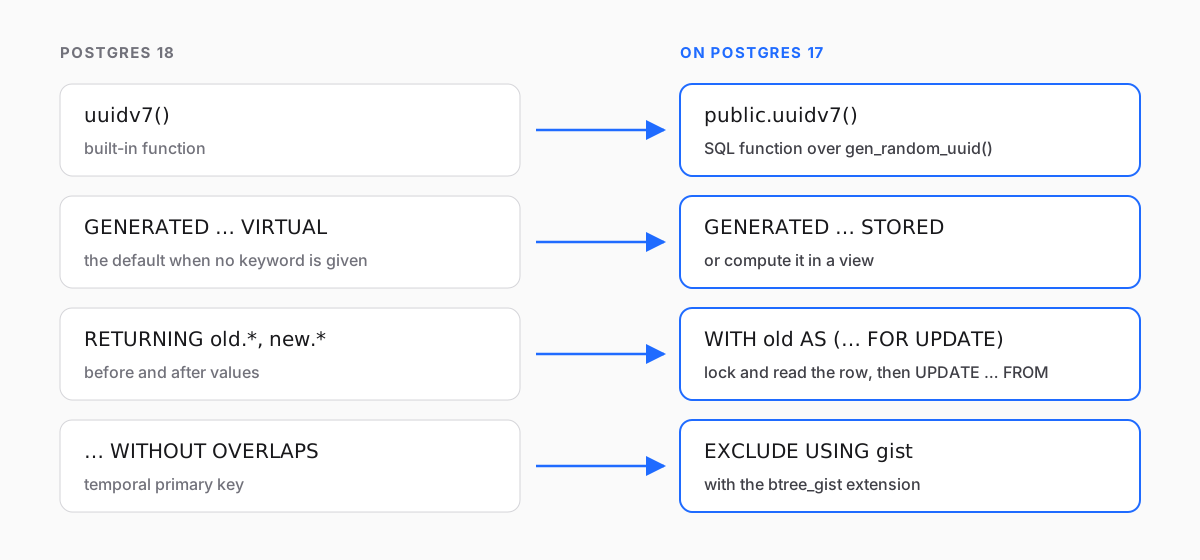
Relyt One runs PostgreSQL 17. Postgres 18 shipped in September 2025, so plenty of new projects, tutorials and AI-generated schemas now lean on 18-only features: uuidv7(), virtual generated columns, OLD and NEW in RETURNING, temporal primary keys. On 17 each of these is an error. This post lists what fails, gives a replacement for each that runs on 17 today, and walks through loading a dump taken on 18. We ran every snippet on PostgreSQL 17.5 and 18.6; the outputs shown are what we got.
None of this is exotic. Most schemas use none of these features, and the ones that do usually use one or two. The point is to find them before a migration fails halfway, not after.
SELECT version();
SHOW server_version_num;   -- 170005 means 17.5; anything starting with 17 is Postgres 17
If your code needs to branch on the version at runtime, compare server_version_num numerically (>= 180000), not the version() string.
Postgres 18 added uuidv7(), which generates time-ordered UUIDs. They make better primary keys than random version 4 UUIDs because new rows land at the end of the index instead of all over it. On 17:
ERROR: function uuidv7() does not existYou can generate the same format in SQL. A version 7 UUID is a 48-bit Unix timestamp in milliseconds followed by random bits, with the version and variant bits set. gen_random_uuid() (built in since Postgres 13, no extension needed) already provides the random bits and the variant, so the function overwrites the first six bytes with the timestamp and flips two bits to change the version from 4 to 7:
CREATE FUNCTION public.uuidv7() RETURNS uuid
LANGUAGE sql VOLATILE
AS $$
  -- 48-bit Unix time in ms, then version 7 over the random bits of a v4 UUID
  SELECT encode(
    set_bit(set_bit(
      overlay(uuid_send(gen_random_uuid())
              PLACING substring(int8send(floor(extract(epoch FROM clock_timestamp()) * 1000)::bigint) FROM 3)
              FROM 1 FOR 6),
      52, 1), 53, 1),
    'hex')::uuid;
$$;

CREATE TABLE events (
  id   uuid PRIMARY KEY DEFAULT public.uuidv7(),
  body text
);
On Postgres 15 and later only the database owner can create objects in public by default, so run this as the owner (or put the function in a schema you own). We checked 10,000 generated values: every one has version 7 and the RFC 9562 variant, and the embedded timestamp matched the server clock. It uses clock_timestamp() rather than now(), so rows inserted later in the same transaction still get later timestamps.
There is one real difference. The built-in function in 18 also fills in a sub-millisecond part, and in our test 1,000 values generated in one statement on 18 came out in strictly increasing order. The SQL version orders values across milliseconds but not within one: values generated in the same millisecond are in random order. For index locality that does not matter. If your code relies on IDs from one session being strictly increasing, use a sequence for ordering instead.
A related trap: uuid_extract_timestamp() exists in 17, but there it only understands version 1 UUIDs and returns NULL for version 7. Postgres 18 added version 7 support. On 17, extract the timestamp yourself:
CREATE FUNCTION public.uuidv7_timestamp(u uuid) RETURNS timestamptz
LANGUAGE sql IMMUTABLE STRICT
AS $$
  SELECT to_timestamp(('x' || substr(replace(u::text, '-', ''), 1, 12))::bit(48)::bigint / 1000.0);
$$;

SELECT public.uuidv7_timestamp('019535d9-3df7-79fb-b466-fa907fa17f9e');
-- 2025-02-24 02:46:24.503+00, the same value 18's uuid_extract_timestamp() returns
Unlike the built-in, this helper doesn't check the version: give it a version 4 UUID and it returns a meaningless time instead of NULL. Only call it on IDs you know are version 7.
In 18, a generated column is computed when it is read unless you say otherwise. VIRTUAL is the new default, and STORED is the old behavior. 17 only has stored generated columns, and it requires the keyword. Both of these fail on 17:
CREATE TABLE product (price_cents int, price numeric GENERATED ALWAYS AS (price_cents / 100.0) VIRTUAL);
-- ERROR:  syntax error at or near "VIRTUAL"

CREATE TABLE product (price_cents int, price numeric GENERATED ALWAYS AS (price_cents / 100.0));
-- ERROR:  syntax error at or near ")"
The second one matters more than it looks: on 18 it is valid and means virtual, so schemas written for 18 often have no keyword at all. Two replacements:
-- Option A: store it. Same column, same queries; costs disk and write time.
CREATE TABLE product (
  price_cents int,
  price       numeric GENERATED ALWAYS AS (price_cents / 100.0) STORED
);

-- Option B: keep the table lean and compute in a view.
CREATE TABLE product_base (price_cents int);
CREATE VIEW product AS
  SELECT *, price_cents / 100.0 AS price FROM product_base;
A simple view like this one is automatically updatable, so INSERT INTO product (price_cents) VALUES (1999) still works through it. We tried that on 17. Pick A unless the expression is large or the table is write-heavy.
18 lets RETURNING name the row before and after a change:
UPDATE acct SET balance = balance - 30 WHERE id = 1
RETURNING old.balance AS before, new.balance AS after;
On 17 that fails with missing FROM-clause entry for table "old". To get the previous values, read and lock the row in a CTE, then join to it in the UPDATE:
WITH old AS (
  SELECT id, balance FROM acct WHERE id = 1 FOR UPDATE
)
UPDATE acct a SET balance = a.balance - 30
FROM old
WHERE a.id = old.id
RETURNING old.balance AS before, a.balance AS after; before | after
--------+-------
100 | 70FOR UPDATE is what makes this correct: it locks the row before the update reads it, so a concurrent change can't land between the two and make before a lie. Without it, under concurrency, you can return a "before" value that was never the row's state at the time of your update. For DELETE, plain RETURNING * already returns the old row. For INSERT … ON CONFLICT DO UPDATE, there is no clean 17 equivalent for the old values. If you need them, select them first with FOR UPDATE, or keep an audit trigger. Selecting first doesn't help when the row doesn't exist yet: there is nothing to lock, so a concurrent insert can still land in between.
18 can enforce "no two rows for the same room with overlapping time ranges" as a primary key:
-- on 18 this also needs btree_gist, because room is a plain int
CREATE TABLE booking (room int, during tstzrange, PRIMARY KEY (room, during WITHOUT OVERLAPS));
-- on 17: ERROR:  syntax error at or near "WITHOUT"
The guarantee itself has been available for years as an exclusion constraint. Mixing a plain equality column (room) with a range in one GiST index needs the btree_gist extension, which is marked trusted, so any role with CREATE on the database (the owner has it) can install it without superuser rights:
CREATE EXTENSION IF NOT EXISTS btree_gist;

CREATE TABLE booking (
  room   int       NOT NULL,
  during tstzrange NOT NULL CHECK (NOT isempty(during)),
  EXCLUDE USING gist (room WITH =, during WITH &&)
);

INSERT INTO booking VALUES (101, '[2026-11-10 09:00Z, 2026-11-10 10:00Z)');
INSERT INTO booking VALUES (101, '[2026-11-10 10:00Z, 2026-11-10 11:00Z)');  -- ok: touching, not overlapping
INSERT INTO booking VALUES (101, '[2026-11-10 09:30Z, 2026-11-10 10:30Z)');
-- ERROR:  conflicting key value violates exclusion constraint "booking_room_during_excl"
The CHECK matters: 18 rejects empty ranges in a WITHOUT OVERLAPS key, but an empty range never overlaps anything, so without the check the exclusion constraint would accept any number of them. Check that the extension is available on your database with SELECT * FROM pg_available_extensions WHERE name = 'btree_gist';. We confirmed it ships, at version 1.7, in the Relyt One compute image we tested. What 17 can't do is the other half of the feature: temporal foreign keys (FOREIGN KEY (…, PERIOD …)). There is no declarative equivalent. Enforce it in a trigger or in the application, and test it, because it is easy to get wrong at the edges of a range.
Several of the headline 18 features change performance or operations, not SQL. Your schema and queries don't mention them, so there is nothing to rewrite:
- Asynchronous I/O speeds up sequential scans, bitmap heap scans and vacuum on 18. On 17 the same queries work and use synchronous I/O.
- Skip scan lets 18 use a multicolumn B-tree index even when the query doesn't filter on the leading column. If a query on 17 filters only on the second column of
(tenant_id, created_at), it may not use that index. Look at the plan withEXPLAIN, and add an index that leads with the filtered column if it matters. - OAuth client authentication is new in 18. You connect to Relyt One with the role's password over TLS, using the connection string from the console with
sslmode=require. - MD5 password deprecation in 18 has no effect on 17 schemas.
The pg_dump documentation is explicit: its output is expected to load into newer servers, and loading into an older major version "is not guaranteed" and "may require manual editing of the dump file". Going from 18 to 17 is that case. Here is the procedure we used, and what broke along the way.
Use a psql of 17.6 or later to load it. Dumps from current pg_dump start with a \restrict line, a psql meta-command added in 17.6 for a security fix (CVE-2025-8714) and included in every Postgres 18 release. psql 17.5 rejects it with invalid command \restrict. With ON_ERROR_STOP=1 the load aborts right there; without it, psql carries on and silently skips the protection \restrict exists to provide. Use an 18.x client or 17.6+: psql 18 connects to a 17 server without trouble.
Dump schema and data separately, without owners or grants, since the roles on the target will differ:
pg_dump "$SOURCE_URL" --schema-only --no-owner --no-privileges --quote-all-identifiers > schema.sql
pg_dump "$SOURCE_URL" --data-only   --no-owner --no-privileges --quote-all-identifiers > data.sql
--quote-all-identifiers is what the pg_dump docs recommend for cross-version loads: it avoids surprises from words that are reserved in one version and not the other. Loading the data after the full schema means indexes, foreign keys and triggers already exist during the load. That is slower than a single dump, and your own triggers fire for every row. For a large database, split with --section=pre-data, data and post-data instead and edit only the pre-data file.
Find the 18-only syntax before loading anything:
grep -nE 'uuidv7\(|uuidv4\(|WITHOUT OVERLAPS|PERIOD ' schema.sql
grep -nE 'GENERATED ALWAYS AS \(' schema.sql | grep -v STORED     # virtual columns
grep -niE 'RETURNING +(old|new)\.|RETURNING +WITH *\(' schema.sql  # in functions and procedures
In our test schema this found two lines:
56:    id uuid DEFAULT uuidv7() NOT NULL,
58:    price numeric GENERATED ALWAYS AS (((cents)::numeric / 100.0))
Note line 58: pg_dump 18 writes a virtual column with no keyword, so searching for VIRTUAL misses it. Any GENERATED ALWAYS AS (…) without STORED after it is virtual, including one followed by NOT NULL. Add STORED.
Qualify the function you replaced. A dump sets search_path to empty at the top, and on 18 uuidv7() is a built-in, so the dump calls it unqualified. Your public.uuidv7() won't be found during the load:
ERROR: function uuidv7() does not existRewrite the default to public.uuidv7(). Then create your replacement functions first, and load everything in one transaction that stops at the first error:
psql "$TARGET_URL" -v ON_ERROR_STOP=1 --single-transaction \
  -f uuidv7.sql -f schema.sql -f data.sql
$TARGET_URL is your Relyt One connection string, ending in ?sslmode=require. With those two edits, our test database loaded cleanly on 17. Identity columns continued from the right value, the generated column was recomputed on load, and new rows got version 7 UUIDs from the replacement function. Generated column values are not in the data dump at all, so switching a column from virtual to stored needs no data changes.
-
SHOW server_version_numon the target; know which major version you are on - Load with psql 17.6+ or 18.x and
-v ON_ERROR_STOP=1 -
grepthe schema dump foruuidv7(,uuidv4(,GENERATED ALWAYS ASwithoutSTORED,WITHOUT OVERLAPS,PERIOD, andRETURNING old./new.in any case - Create replacement functions before the schema, and qualify them (
public.uuidv7()) - Replace
WITHOUT OVERLAPSwith an exclusion constraint; move temporal foreign keys into a trigger - Search application code too: ORMs and query builders generate
RETURNING, and schema files in the repo may target 18 - Run the test suite against a branch before pointing production at it
That last step is cheap on Relyt One: create a branch, load into it, run your tests against its connection string, and throw it away if something is off.


