
Introducing Relyt One: serverless Postgres that branches like code
Relyt One is serverless PostgreSQL 17 with copy-on-write branches, compute that suspends when idle, built-in vector search and managed auth. Here is how it works and how to go from sign-in to a branched database in five minutes.
On this page

Relyt One is serverless Postgres for developers and AI agents. You get standard PostgreSQL 17, a database branch for every pull request, preview and agent run, compute that suspends when nobody is using it, and the pieces most apps end up bolting on: connection pooling, vector search, an Open API and managed auth. It is free to start, there is no credit card, and you can sign in with GitHub or Google and have a database a few minutes later.
This post explains what Relyt One is, why it is built the way it is, and what working with it actually looks like, from the first connection string to a throwaway branch with production data in it.
Postgres is the default database for new applications, and for good reason. What has not changed much is how we run it. A managed Postgres instance is still, at heart, a machine: a fixed amount of CPU and memory with a disk attached, running whether or not anyone is talking to it.
That model has three costs that show up in every team sooner or later.
Environments are expensive, so there are too few of them. Everyone wants a staging database that looks like production, a database per pull request, a sandbox where a migration can fail safely. With machine-shaped Postgres each of those is another instance to provision, another dump to restore, another bill. So teams share one staging database, test migrations against a few seed rows, and find out about the slow ALTER TABLE in production.
Idle databases cost the same as busy ones. Side projects, internal tools, preview environments and demo apps spend most of their lives doing nothing. A machine that is always on charges you for all of that nothing.
Agents make both problems worse. A coding agent that can create a database for every task, try a schema change, run the tests and throw the result away is far more useful than one that has to share your development database. But that only works if a database is as cheap and fast to create as a git branch.
Relyt One starts from a different architecture to make all three go away.
The core idea is that compute and storage are separate.
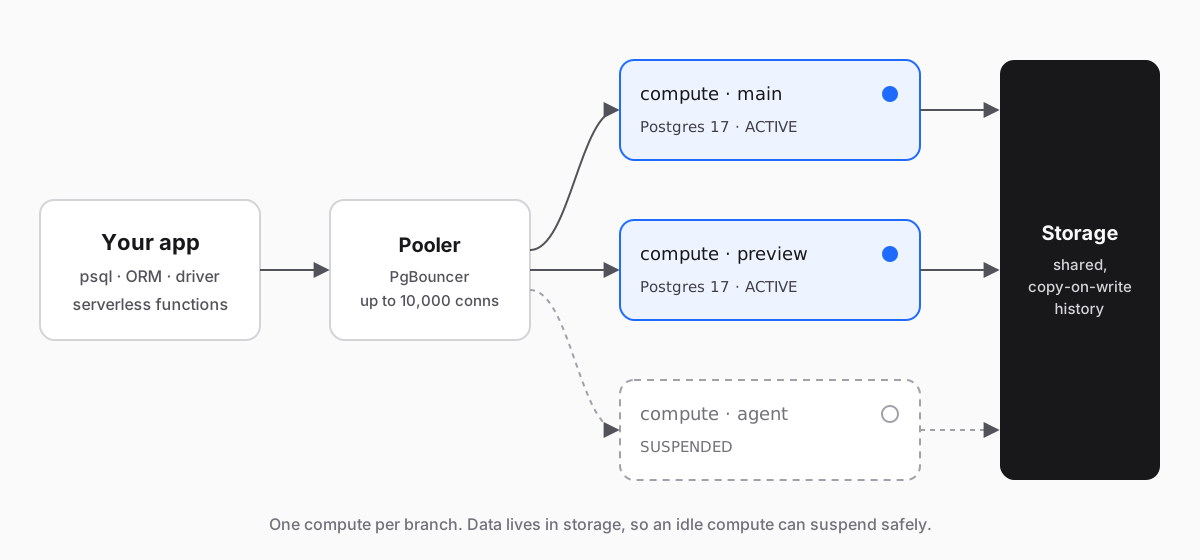
Storage is a shared layer that keeps the history of your data. Compute is a regular Postgres 17 process that serves queries for one branch and reads its pages from storage. Because the data does not live on the compute's disk, three things become cheap that used to be expensive.
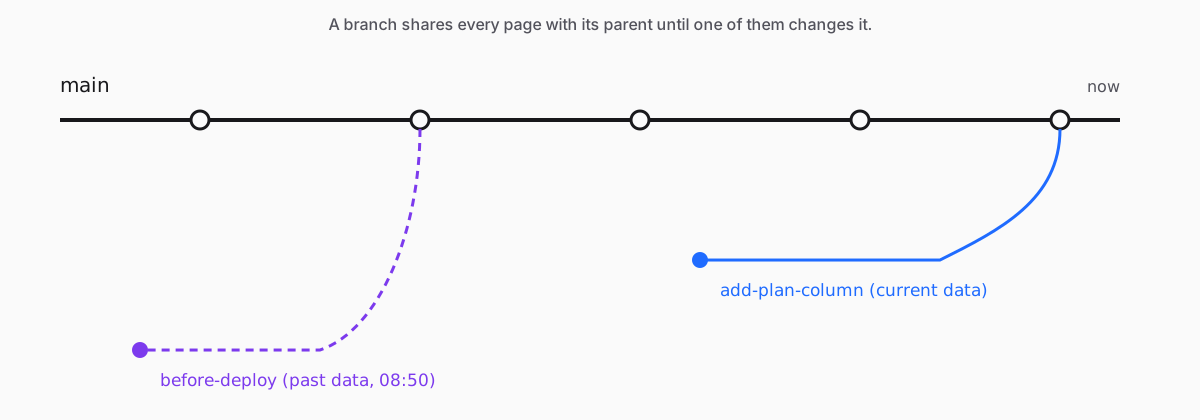
A branch is a new line of history that starts from its parent at a point in time. Creating one does not copy your data: the new branch shares every page with its parent until one of them changes it, and only the changed pages take up new space. That is why creating a branch costs the same whether the parent holds a megabyte or a hundred gigabytes, and why the console can show you each branch's storage delta from its parent rather than a full copy. The new branch's compute takes a short while to provision; the data is there as soon as it is.
Branches form a tree. You can branch from main and branch again from that branch. Deleting a branch never touches its parent or its siblings; a branch that still has children has to wait until they are gone. The primary branch can't be deleted, so main is always there.
You can also branch from the past. When a project keeps history (up to the last 3 hours, set in the project's history retention setting), a new branch can start from the parent's data at any moment inside that window instead of from "now". That is useful for the bad-migration morning: branch from ten minutes before the deploy, check what the rows looked like, and copy back what you need.
Each branch is served by its own compute, sized in compute units (1 CU = 1 vCPU + 4 GB RAM). A heavy test run on a preview branch never competes with production for CPU, and an agent's experiment can't lock the tables your users are reading.
When a compute has had nothing to do for a while (about ten minutes by default), it suspends: its status goes from ACTIVE to SUSPENDED and it stops using CPU. Your data is untouched, because it was never on the compute in the first place. The next connection resumes it. For the long tail of databases that are busy for minutes a day, that is the difference between paying for a machine and paying for work.
- PostgreSQL 17, not a lookalike. Your drivers, ORMs,
psql, pgAdmin and DBeaver work unchanged. Extensions such aspg_trgm,citextandpgcryptoare available withCREATE EXTENSION. - Branches from current data or from the last few hours, each with its own compute, created from the console or the API.
- Connection pooling through PgBouncer with transaction-level pooling, for up to 10,000 concurrent connections. Use the pooled connection string for serverless functions and other short-lived connections.
- Vector search built in. The
vectorsextension (pgvecto.rs, not pgvector) is preloaded and created in your databases by default, so embeddings live next to the rows they describe. - Observability for every compute: CPU, memory, connections and database size charts, live active queries, and query history with call counts and timings.
- An Open API with API keys that covers organizations, projects, branches and computes.
- Managed auth (preview). Sign-in for your app's users, attached to a branch, with users stored in that branch's own database. More on this in Managed auth for Relyt One, now in preview.
Here is the whole loop: create a project, connect, branch, change the schema on the branch, and throw the branch away.
Sign in with GitHub or Google. A free organization is created for you on the first sign-in.
Create a project: give it a name, pick a region and set the PostgreSQL password. The project starts with a primary branch, main, a primary compute, a database relytdb and its owner role relytdb_owner. Provisioning the compute can take a few minutes; the branch page tells you when it is ready.
Open the branch and choose Connect. Pick the compute, database and role, and copy the connection string. The dialog also has ready-made snippets for Prisma and Java, host and port details for GUI clients, and the pooled connection string.
export DATABASE_URL="postgresql://<role>:<password>@<host>/<database>?sslmode=require"
psql "$DATABASE_URL" -c "select version();"
Create a table and some rows to have something to branch:
CREATE TABLE customers (
  id         bigint GENERATED ALWAYS AS IDENTITY PRIMARY KEY,
  email      text NOT NULL UNIQUE,
  created_at timestamptz NOT NULL DEFAULT now()
);

INSERT INTO customers (email)
SELECT 'user' || g || '@example.com' FROM generate_series(1, 100000) AS g;On the Branches page, choose New Branch, select main as the parent and keep Current data. Name it add-plan-column.
The branch has all 100,000 rows from the start, plus its own compute and its own connection string; once the compute reports ready, connect to it. Nothing was copied: the storage delta from the parent starts at zero.
The same thing over the Open API, which is what a CI job or an agent would use ($PROJECT_ID is the project's obj-… id, and parentBranchSlug is the parent's br-… slug):
curl https://relyt.one/api/v1/projects/$PROJECT_ID/branches \
  -H "x-api-key: $RELYT_API_KEY" \
  -H "content-type: application/json" \
  -d '{"name": "add-plan-column", "parentBranchSlug": "br-..."}'
Add "pointInTime": "2026-10-30T08:50:00Z" to branch from the parent as it was at that moment instead; the time has to fall inside the project's history retention window.
Connect to the branch and run the migration you are not sure about:
ALTER TABLE customers ADD COLUMN plan text NOT NULL DEFAULT 'free';
CREATE INDEX customers_plan_idx ON customers (plan);
You find out how long it takes on real data, what the query plans look like afterwards and whether your application still works, all without touching main. Open Monitoring, pick the branch's compute, and you can see the CPU spike and the statements in Query History.
Happy with the result? Run the same migration on main through your normal deploy. Not happy? Delete the branch. Either way the experiment cost you a few seconds of compute and the pages it changed.
Creating and deleting projects and branches is an API call, which makes Relyt One a good fit for coding agents that need a real database for each task.
- The Open API creates and deletes projects and branches (each branch comes with its own compute), reads compute status and metrics, and manages API keys. The API reference lists every endpoint.
- The open-source agent skills pack teaches Claude Code and other agents how to provision, branch and connect, so they don't have to guess.
- Branch per task. Give an agent its own branch, let it run migrations and tests there, and review the diff before anything reaches
main.
Every account starts on the Free plan:
| Free | |
|---|---|
| Organizations | 1 |
| Projects | 5 |
| Storage | 2.5 GB (0.5 GB per project included) |
| Compute | Unlimited shared compute hours (early-bird offer) |
There is no credit card and no trial clock.
The database is Postgres, and the tooling around it is open: @relyt/auth for verifying managed-auth tokens, example apps, and the agent skills, all MIT-licensed on GitHub.
Sign in, create a project, and branch it. If something is confusing or broken, we want to hear about it: use the feedback button in the console.
TagsPostgresserverlessbranching


