
Five ways row-level security fails open
Row-level security is the best defense against a forgotten WHERE clause, until it silently stops applying. Five ways it fails open on PostgreSQL 17, each with a reproduction, a fix, and a catalog query that catches it in CI.
On this page

Row-level security (RLS) is the best defense Postgres gives you against the forgotten WHERE user_id = …. It is also easy to switch off without noticing: a role with one attribute, a view created by the wrong user, a setting that comes back as an empty string instead of NULL. This post walks through five ways RLS silently stops protecting your data. Each comes with a reproduction you can paste into psql, a fix, and, at the end, a single catalog query that catches many of them in CI. Every snippet was run on PostgreSQL 17.11, the same major version Relyt One runs.
If you followed Getting started with Relyt One managed auth, you already use the pattern we test here: the app sets app.user_id from a verified token at the start of each transaction, and a policy compares each row's owner with it. That pattern is sound. The failures below are not bugs in Postgres. They are the places where the pattern quietly stops applying, and they all fail the same way: no error, no log line, just rows going to someone who shouldn't see them.
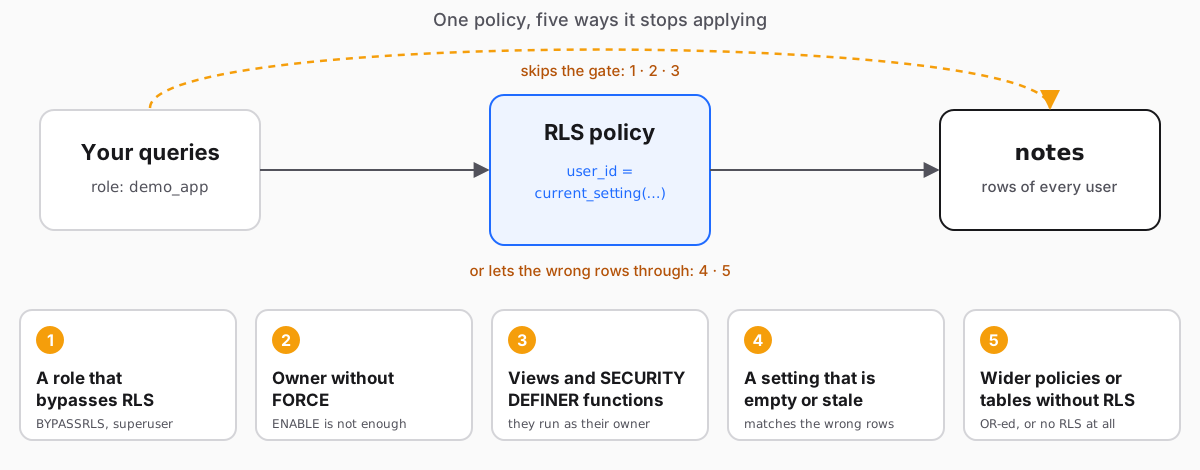
Everything below runs in one psql session as a superuser, switching identity with SET ROLE. Statements that create or alter objects (tables, policies, views) are meant to run as demo_owner or a superuser; the ones that act as the application start with SET ROLE demo_app. Three roles stand in for what a real project has:
demo_ownerowns the tables and runs migrations;demo_appis what the application connects as, withNOBYPASSRLS;demo_adminhasBYPASSRLS. On Relyt One this isrelytdb_owner, the owner role every project starts with.
CREATE ROLE demo_owner NOLOGIN;
CREATE ROLE demo_app   NOLOGIN;
CREATE ROLE demo_admin NOLOGIN BYPASSRLS;
CREATE SCHEMA demo AUTHORIZATION demo_owner;
GRANT USAGE ON SCHEMA demo TO demo_app;
GRANT USAGE, CREATE ON SCHEMA demo TO demo_admin;
One table, one policy, four rows. The last row has an empty owner; you'll see why in section 4.
SET ROLE demo_owner;
CREATE TABLE demo.notes (id serial PRIMARY KEY, user_id text NOT NULL, body text NOT NULL);
INSERT INTO demo.notes (user_id, body)
  VALUES ('alice', 'a1'), ('alice', 'a2'), ('bob', 'b1'), ('', 'orphan');

ALTER TABLE demo.notes ENABLE ROW LEVEL SECURITY;
ALTER TABLE demo.notes FORCE ROW LEVEL SECURITY;
CREATE POLICY own ON demo.notes FOR ALL
  USING      (user_id = current_setting('app.user_id', true))
  WITH CHECK (user_id = current_setting('app.user_id', true));
RESET ROLE;

GRANT SELECT, INSERT, UPDATE, DELETE ON demo.notes TO demo_app;
GRANT USAGE, SELECT ON ALL SEQUENCES IN SCHEMA demo TO demo_app;
GRANT SELECT ON demo.notes TO demo_admin;
A normal request, as the application would send it:
SET ROLE demo_app;
BEGIN;
SELECT set_config('app.user_id', 'alice', true);  -- true: local to this transaction
SELECT body FROM demo.notes;                      -- a1, a2
COMMIT;
Alice sees her two rows. Now let's break it.
The PostgreSQL documentation is blunt: "Superusers and roles with the BYPASSRLS attribute always bypass the row security system when accessing a table." Policies are not consulted at all.
SET ROLE demo_app;
BEGIN; SELECT set_config('app.user_id', 'alice', true);
SELECT count(*) FROM demo.notes;                       -- 2   (the policy applies)
COMMIT;
SET ROLE demo_admin; SELECT count(*) FROM demo.notes;  -- 4   (BYPASSRLS: every row)
RESET ROLE;          SELECT count(*) FROM demo.notes;  -- 4   (superuser: every row)
The attribute belongs to the role, not to its members. If demo_app is a member of demo_admin, it is still filtered, until some code runs SET ROLE demo_admin:
GRANT demo_admin TO demo_app;
SET ROLE demo_app;
BEGIN; SELECT set_config('app.user_id', 'alice', true);
SELECT count(*) FROM demo.notes;                       -- 2   (membership alone does not bypass)
COMMIT;
SET ROLE demo_admin; SELECT count(*) FROM demo.notes;  -- 4
On Relyt One this matters more than it sounds. Database users created from the console have BYPASSRLS, and so does relytdb_owner. We checked on a real branch: a table with FORCE and a correct policy, queried as relytdb_owner, returned every row. An app that connects as one of those roles has no row-level security at all. Create a dedicated role with SQL and connect as that; the managed-auth guide shows how, and we verified that such a role logs in through both the direct and the pooled connection strings.
The test: run this as the role your application connects as. It must return false.
SET ROLE demo_app;
SELECT rolsuper OR rolbypassrls AS bypasses_rls FROM pg_roles WHERE rolname = current_user; -- fBy default, "table owners normally bypass row security as well, though a table owner can choose to be subject to row security with ALTER TABLE ... FORCE ROW LEVEL SECURITY." ENABLE alone protects everyone except the role that owns the table.
SET ROLE demo_owner;
CREATE TABLE demo.notes2 (id serial PRIMARY KEY, user_id text NOT NULL, body text NOT NULL);
INSERT INTO demo.notes2 (user_id, body) VALUES ('alice', 'x'), ('bob', 'y');
ALTER TABLE demo.notes2 ENABLE ROW LEVEL SECURITY;          -- enabled, not forced
CREATE POLICY own ON demo.notes2 FOR ALL
  USING      (user_id = current_setting('app.user_id', true))
  WITH CHECK (user_id = current_setting('app.user_id', true));

SELECT count(*) FROM demo.notes2;   -- 2  (alice's and bob's: the policy was skipped)

ALTER TABLE demo.notes2 FORCE ROW LEVEL SECURITY;
SELECT count(*) FROM demo.notes2;   -- 0  (now the owner is subject to the policy)
RESET ROLE;
If your migration tool and your application share one role, that role is the owner, and your application bypasses RLS. Use FORCE on every table that holds user data, and keep the owner out of the request path. On Relyt One the owner has BYPASSRLS, so FORCE can't help it; the fix there is section 1.
A view runs with its owner's permissions. The CREATE VIEW docs: "By default, access to the underlying base relations referenced in the view is determined by the permissions of the view owner", and so are the row-level security policies. A SECURITY DEFINER function does the same thing with the function owner's identity. Both are useful, and both are exactly what RLS was supposed to prevent when the owner bypasses it.
Take notes2 again, put it back to "enabled, not forced", add a view over it and a definer function, both owned by demo_owner, and ask for alice's rows:
ALTER TABLE demo.notes2 NO FORCE ROW LEVEL SECURITY;
GRANT SELECT ON demo.notes2 TO demo_app, demo_admin;

SET ROLE demo_owner;
CREATE VIEW demo.v_notes2 AS SELECT * FROM demo.notes2;
CREATE FUNCTION demo.count_notes2() RETURNS bigint
  LANGUAGE sql SECURITY DEFINER SET search_path = demo, pg_temp
  AS $$ SELECT count(*) FROM demo.notes2 $$;
RESET ROLE;
GRANT SELECT ON demo.v_notes2 TO demo_app;
GRANT EXECUTE ON FUNCTION demo.count_notes2() TO demo_app;

SET ROLE demo_app;
BEGIN;
SELECT set_config('app.user_id', 'alice', true);
SELECT count(*) FROM demo.notes2;     -- 1
SELECT count(*) FROM demo.v_notes2;   -- 2   leak
SELECT demo.count_notes2();           -- 2   leak
COMMIT;
Adding FORCE to the table closes both holes, because the owner is now subject to the policy too. But if the owner itself bypasses RLS, FORCE does nothing. Create a view as demo_admin (our stand-in for relytdb_owner) and it leaks on a forced table:
| Where alice's query runs | Rows she sees |
|---|---|
| Directly on the table | 1 |
| Through a view owned by the table owner (table not forced) | 2 |
Through a SECURITY DEFINER function (table not forced) | 2 |
Same view and function after FORCE | 1 |
Through a view owned by a BYPASSRLS role, table forced | 2 |
Same view with security_invoker = true | 1 |
To see the last two rows, create a view as demo_admin and force the table:
RESET ROLE;
ALTER TABLE demo.notes2 FORCE ROW LEVEL SECURITY;
SET ROLE demo_admin;
CREATE VIEW demo.v_admin AS SELECT * FROM demo.notes2;     -- owned by a BYPASSRLS role
RESET ROLE;
GRANT SELECT ON demo.v_admin TO demo_app;

SET ROLE demo_app;
BEGIN; SELECT set_config('app.user_id', 'alice', true);
SELECT count(*) FROM demo.v_admin;    -- 2   leak, although the table is forced
COMMIT;
The real fix is security_invoker, added in PostgreSQL 15 ("Allow table accesses done by a view to optionally be controlled by privileges of the view's caller"). With it, the policies of the user running the query apply:
CREATE VIEW demo.v_safe WITH (security_invoker = true) AS SELECT * FROM demo.notes2;
ALTER VIEW demo.v_admin SET (security_invoker = true);   -- fix an existing view; alice now sees 1 row
For SECURITY DEFINER functions over tables with user data, prefer not to have them. If you must, pass the user in as an argument and filter by it explicitly inside, and always pin search_path, as in the example above.
The pattern depends on current_setting('app.user_id', true). The second argument means "return NULL instead of raising an error if the setting doesn't exist", and that is what a fresh session returns. Then a transaction sets the value with set_config(…, true) and ends. What does the next query see?
Start a fresh session first, because the requests above already left the setting defined:
-- psql: reconnect to get a fresh session
\c
SET ROLE demo_app;
SELECT coalesce(current_setting('app.user_id', true), '<NULL>');       -- <NULL>

BEGIN; SELECT set_config('app.user_id', 'alice', true); COMMIT;

SELECT '[' || coalesce(current_setting('app.user_id', true), '<NULL>') || ']';  -- []
SELECT user_id || '/' || body FROM demo.notes;                         -- /orphan
Not NULL: an empty string. We saw this on PostgreSQL 15, 16 and 17: the setting stays defined after the transaction, with an empty value. It isn't documented behaviour, so check it on your own version. A policy that compares user_id = '' matches any row whose owner is the empty string, and our table has one. Rows like that come from bugs and migrations: an empty sub that slipped past validation, a default value nobody meant. They are the rows you least want to expose.
The other half of this section is the mistake in the third argument. With false the setting lasts for the whole session, and with a connection pool the next request on that connection inherits it:
SET ROLE demo_app;
SELECT set_config('app.user_id', 'alice', false);   -- session-wide
SELECT count(*) FROM demo.notes;                    -- 2, for whoever uses this connection next
The fix is to make the policy refuse an empty setting, and to stop empty owners from existing:
RESET ROLE;
ALTER POLICY own ON demo.notes
  USING      (nullif(current_setting('app.user_id', true), '') IS NOT NULL
              AND user_id = current_setting('app.user_id', true))
  WITH CHECK (nullif(current_setting('app.user_id', true), '') IS NOT NULL
              AND user_id = current_setting('app.user_id', true));

ALTER TABLE demo.notes ADD CONSTRAINT user_id_not_empty CHECK (user_id <> '') NOT VALID;
Check it from a fresh session:
-- psql: reconnect to get a fresh session
\c
SET ROLE demo_app;
BEGIN; SELECT set_config('app.user_id', 'alice', true); COMMIT;
SELECT count(*) FROM demo.notes;                         -- 0   (the empty setting matches nothing now)
BEGIN; SELECT set_config('app.user_id', 'alice', true);
SELECT count(*) FROM demo.notes;                         -- 2   (alice's normal request still works)
COMMIT;(NOT VALID lets you add the constraint while an old empty row exists; clean the row, then VALIDATE CONSTRAINT.) Keep set_config(…, true) as the only form your data-access function ever calls.
Policies add up. "When multiple policies apply to a given query, they are combined using either OR (for permissive policies, which are the default) or using AND (for restrictive policies)." One extra permissive policy, added for a report or a support tool, widens access for everyone:
RESET ROLE;
CREATE POLICY pub ON demo.notes FOR SELECT USING (true);

SET ROLE demo_app;
BEGIN; SELECT set_config('app.user_id', 'alice', true);
SELECT count(*) FROM demo.notes;    -- 4, alice sees everything
COMMIT;
A RESTRICTIVE policy is combined with AND, so it keeps a floor under whatever permissive policies are added later:
RESET ROLE;
CREATE POLICY tenant_guard ON demo.notes AS RESTRICTIVE FOR SELECT
  USING (nullif(current_setting('app.user_id', true), '') IS NOT NULL
         AND user_id = current_setting('app.user_id', true));

SET ROLE demo_app;
BEGIN; SELECT set_config('app.user_id', 'alice', true);
SELECT count(*) FROM demo.notes;    -- 2 again, even with `pub` in place
COMMIT;
New tables start without RLS. If you also granted the application role default privileges, the first table you create and forget about is readable by everyone:
RESET ROLE;
ALTER DEFAULT PRIVILEGES FOR ROLE demo_owner IN SCHEMA demo GRANT SELECT ON TABLES TO demo_app;

SET ROLE demo_owner;
CREATE TABLE demo.notes_new (user_id text NOT NULL, body text NOT NULL);   -- nobody runs ENABLE ROW LEVEL SECURITY
INSERT INTO demo.notes_new VALUES ('alice', 'n1'), ('bob', 'n2');
RESET ROLE;

SET ROLE demo_app;
BEGIN; SELECT set_config('app.user_id', 'alice', true);
SELECT count(*) FROM demo.notes_new;    -- 2, alice sees bob's row too
COMMIT;
The reverse is safe: a table with RLS enabled and no policy is "default deny", with no rows visible or updatable.
- A policy with only
USING. ForALLandUPDATEpolicies, "if noWITH CHECKexpression is defined, then theUSINGexpression will be used" for new rows too.INSERTpolicies can't have aUSINGclause at all. On a real Relyt One branch, our test of a user writing a row owned by someone else was rejected by the policy. - A command with no policy. With RLS enabled and no applicable policy, the docs say a "default deny" policy is assumed. A table that only has a
FOR SELECTpolicy rejects inserts.
Unique constraints. "Referential integrity checks, such as unique or primary key constraints and foreign key references, always bypass row security to ensure that data integrity is maintained." The docs call the consequence a "covert channel". Bob can't read alice's slug, but he can learn it exists:
SET ROLE demo_owner;
CREATE TABLE demo.slugs (id serial PRIMARY KEY, user_id text NOT NULL, slug text NOT NULL UNIQUE);
INSERT INTO demo.slugs (user_id, slug) VALUES ('alice', 'secret-project');
ALTER TABLE demo.slugs ENABLE ROW LEVEL SECURITY;
ALTER TABLE demo.slugs FORCE ROW LEVEL SECURITY;
CREATE POLICY own ON demo.slugs FOR ALL
  USING      (user_id = current_setting('app.user_id', true))
  WITH CHECK (user_id = current_setting('app.user_id', true));
RESET ROLE;
GRANT SELECT, INSERT ON demo.slugs TO demo_app;
GRANT USAGE, SELECT ON ALL SEQUENCES IN SCHEMA demo TO demo_app;

SET ROLE demo_app;
BEGIN; SELECT set_config('app.user_id', 'bob', true);
SELECT count(*) FROM demo.slugs WHERE slug = 'secret-project';              -- 0
INSERT INTO demo.slugs (user_id, slug) VALUES ('bob', 'secret-project');
-- ERROR:  duplicate key value violates unique constraint "slugs_slug_key"
ROLLBACK;
Make uniqueness per tenant and the leak is gone: bob's insert succeeds. If a value must be unique across all users, accept that its existence is public.
RESET ROLE;
ALTER TABLE demo.slugs DROP CONSTRAINT slugs_slug_key, ADD UNIQUE (user_id, slug);
Materialized views. The documentation doesn't mention them, so test yours. A materialized view stores the rows as they were when someone refreshed it, and reading the stored rows doesn't run the table's policies. In our test, a view built while alice's setting was active showed alice's two rows to bob:
SET ROLE demo_owner;
BEGIN; SELECT set_config('app.user_id', 'alice', true);
CREATE MATERIALIZED VIEW demo.m_notes AS SELECT * FROM demo.notes;   -- stores alice's rows
COMMIT;
RESET ROLE;
GRANT SELECT ON demo.m_notes TO demo_app;

SET ROLE demo_app;
BEGIN; SELECT set_config('app.user_id', 'bob', true);
SELECT count(*) FROM demo.m_notes;    -- 2   bob reads alice's rows
COMMIT;
Don't grant application roles access to materialized views over user data. Put the tenant column in the view and filter by it in the query, or read the base table.
One more note from the docs: a policy expression is evaluated for each row "prior to any conditions or functions coming from the user's query", with one exception: "leakproof functions, which are guaranteed to not leak information; the optimizer may choose to apply such functions ahead of the row-security check." Treat a LEAKPROOF marking as a promise you have to be able to keep.
Most of the list above leaves fingerprints in the catalog. This query returns one row per finding. It looks at the public schema (change the name for others). Run it as the role your application connects as, and fail the build when it returns anything:
-- rls_audit.sql: what can let one user's rows reach another (schema "public")
WITH tbl AS (
  SELECT c.oid, c.relname, c.relrowsecurity, c.relforcerowsecurity
  FROM pg_class c JOIN pg_namespace n ON n.oid = c.relnamespace
  WHERE n.nspname = 'public' AND c.relkind IN ('r', 'p')
)
SELECT 'connected role bypasses RLS' AS problem, current_user::text AS object
  FROM pg_roles WHERE rolname = current_user AND (rolsuper OR rolbypassrls)
UNION ALL
SELECT 'table without RLS', relname FROM tbl WHERE NOT relrowsecurity
UNION ALL
SELECT 'RLS enabled but not forced', relname FROM tbl WHERE relrowsecurity AND NOT relforcerowsecurity
UNION ALL
SELECT 'view without security_invoker', c.relname
  FROM pg_class c JOIN pg_namespace n ON n.oid = c.relnamespace
  WHERE n.nspname = 'public' AND c.relkind = 'v'
    AND NOT EXISTS (SELECT 1 FROM unnest(coalesce(c.reloptions, '{}')) o
                    WHERE o ~* '^security_invoker=(true|t|yes|y|on|1)$')
UNION ALL
SELECT 'materialized view or foreign table (RLS does not apply)', c.relname
  FROM pg_class c JOIN pg_namespace n ON n.oid = c.relnamespace
  WHERE n.nspname = 'public' AND c.relkind IN ('m', 'f')
UNION ALL
SELECT 'SECURITY DEFINER function', p.proname
  FROM pg_proc p JOIN pg_namespace n ON n.oid = p.pronamespace
  WHERE n.nspname = 'public' AND p.prosecdef
UNION ALL
SELECT 'permissive policy that allows every row', p.polname
  FROM pg_policy p
  WHERE p.polrelid IN (SELECT oid FROM tbl) AND p.polpermissive AND pg_get_expr(p.polqual, p.polrelid) = 'true'
ORDER BY 1, 2;set -euo pipefail
out=$(psql "$DATABASE_URL" -X -A -t -v ON_ERROR_STOP=1 -f rls_audit.sql) # a connection or SQL error stops the build
if [ -n "$out" ]; then echo "$out"; exit 1; fiWe ran it against a schema built to contain every problem above. It reported all of them (the role, the new table without RLS, the unforced table, the plain view, the definer function, the materialized view, the foreign table and the policy that allows everything), ignored views with security_invoker switched on in any of its spellings, and returned nothing once the schema was fixed. It can't see whether the setting is empty, or whether policies combine into something wider than you meant (it only catches a policy that is literally true). Those need tests that run requests as a user and count rows, like the ones in the TODO example. Tables that legitimately hold no user data, such as lookup tables, will show up under "table without RLS"; add an allow-list for them.
- The application connects as a role with
NOBYPASSRLSand no superuser, and the audit's first check is empty. On Relyt One that is neverrelytdb_owneror a console-created user. - Every table with user data has
ENABLEandFORCE ROW LEVEL SECURITY, and the owner stays out of the request path. - Views over those tables use
security_invoker = true; user-facingSECURITY DEFINERfunctions are avoided or filter explicitly. - Policies refuse an empty setting, and a
CHECK (user_id <> '')backs them up.set_configis only ever called withtrue. - A
RESTRICTIVEpolicy sits under the permissive ones, and the audit runs in CI so a new table can't ship without RLS. - Unique constraints on user data include the tenant column, and application roles are not granted materialized views over user data.
Row-level security rewards being tested like any other access-control code: log in as each kind of user, ask for each kind of query, count the rows. If you build on managed auth, the preview post explains how the user id reaches the database, and the TODO example has the tests.


